Advance Management
The Advance Management module makes it easy to record, track, and recover employee advances. Issue advances in a single payment or multiple installments, and recover them either automatically at salary time or through a manual adjustment — all controlled by the admin or authorized managers with a clear approval workflow behind every entry.
Key Highlights of Advance Management
1. Advance Entry
The admin or authorized manager records an advance given to an employee — entering the amount, date, and any relevant details. Every advance is stored against the employee's profile immediately.
2. Approval Workflow
Every advance entry goes through an approval process. Only the admin or managers with the right permission — granted by the admin — can approve and process an advance request.
3. Multiple Installments
Advances can be issued in multiple installments. If an employee needs a large amount, it can be released in parts over time — each installment recorded separately and tracked under the same employee profile.
4. Salary Deduction
At salary time, the outstanding advance amount can be deducted automatically from the employee's salary. The system shows the gross salary, the advance deducted, and the final payable amount clearly.
5. Manual Adjustment
If a full salary deduction is not suitable, the advance can be partially or manually adjusted — giving the admin flexibility to recover the amount at a pace that works for both the business and the employee.
6. Advance History
Every advance given, every installment issued, and every deduction made is stored in the employee's record — giving managers a full, clear history of advances and recoveries at any time.
7. Role-Based Access
Only the admin and managers with permission granted by the admin can issue, approve, or view advance details. Sensitive financial data stays in the right hands.
Advance Payment (Pay)
Overview
Give your workers a paid advance whenever they need it, and keep it tracked against their profile automatically.
Key Highlights
- Record advance payments directly from the worker's profile
- Track amount, date, and comments for every transaction
- Running "Paid in Advance" balance updates instantly
- Full transaction history with date-wise filtering
- Edit or delete entries anytime
How It Works
- Open the worker's profile and go to the Transactions tab
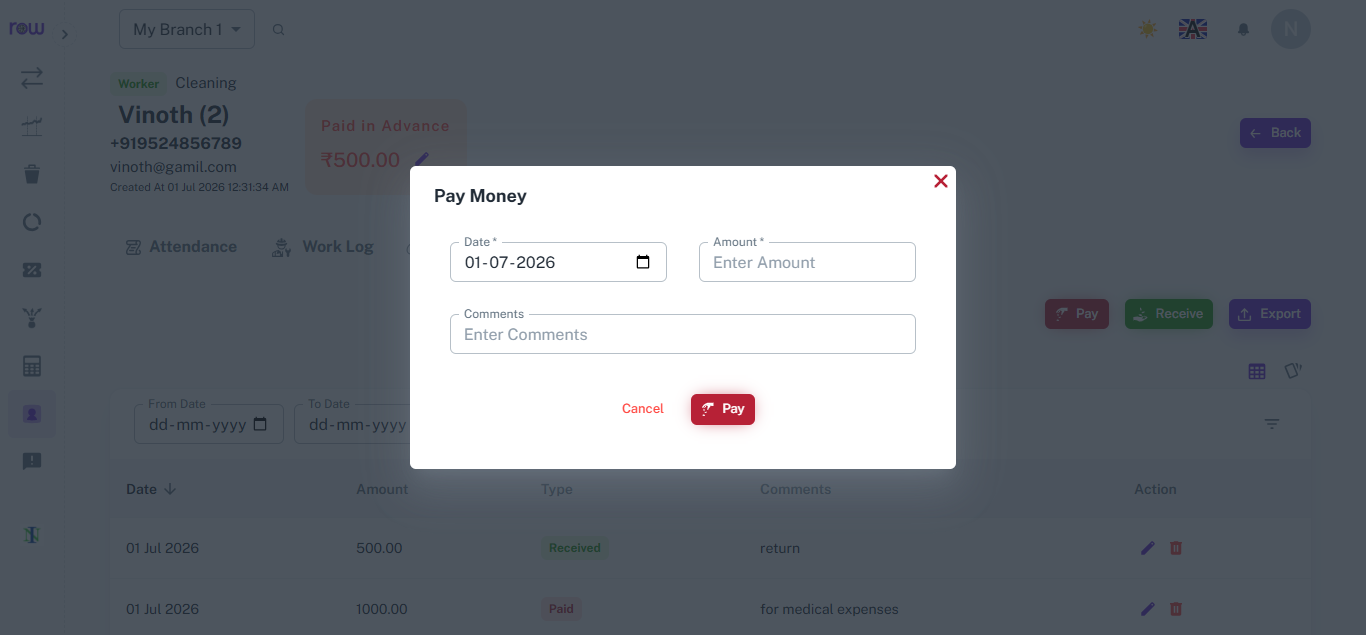
- Click Pay
- Enter the date, advance amount and a comment
- Confirm to save
- Advance balance and transaction list update instantly
Workflow
The worker requests an advance, and the manager opens their profile, clicks Pay, enters the amount and a comment, then confirms — instantly recording the advance and updating the balance.
Advance Repayment (Receive)
Overview
When a worker returns part or all of their advance, record it in seconds and watch the balance adjust automatically.
Key Highlights
- Record partial or full repayments against advance paid
- Advance balance reduces automatically with each repayment
- Comments field for repayment context
- Instant confirmation on successful entry
- All repayments logged in the same transaction history
How It Works
- Open the worker's Transactions tab
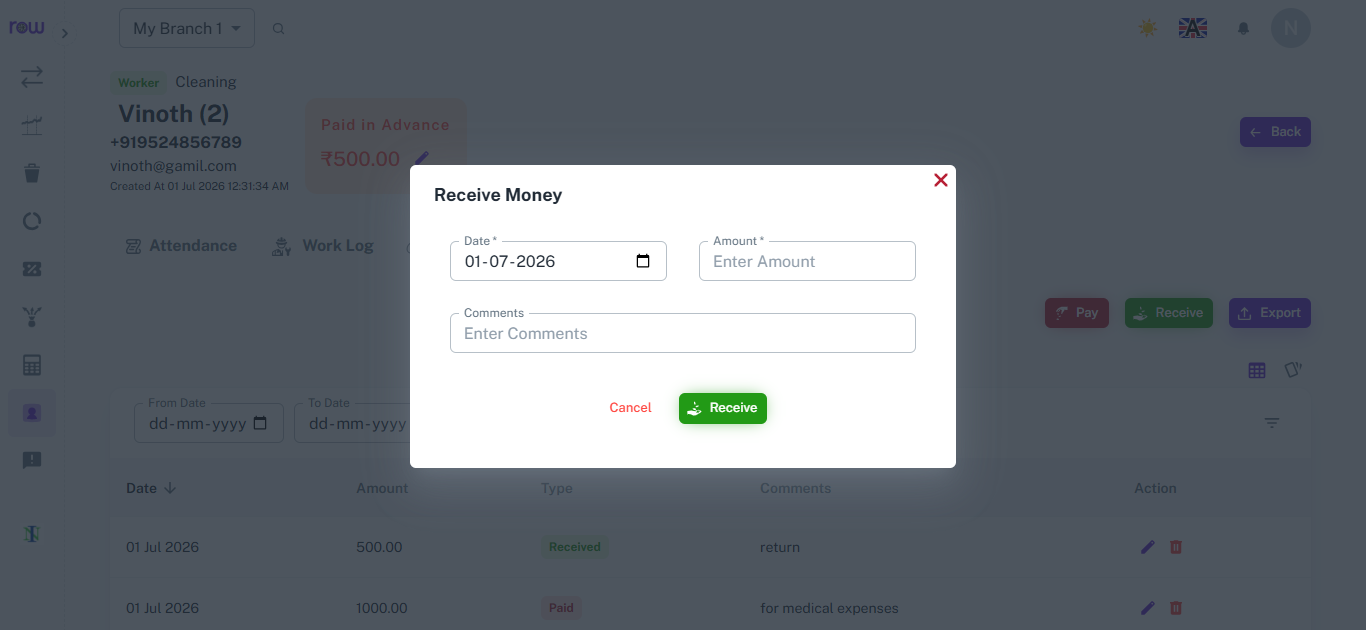
- Click Receive
- Enter the date, repayment amount and an optional comment
- Confirm to save
- Outstanding advance balance is deducted automatically
Workflow
The worker repays the advance amount, and the manager opens the Transactions tab, clicks Receive, enters the amount and a comment, then confirms — automatically updating the outstanding balance.
Advance Transactions List
Overview
See every advance payment and repayment for a worker in one place, with running balance and full transaction history.
Key Highlights
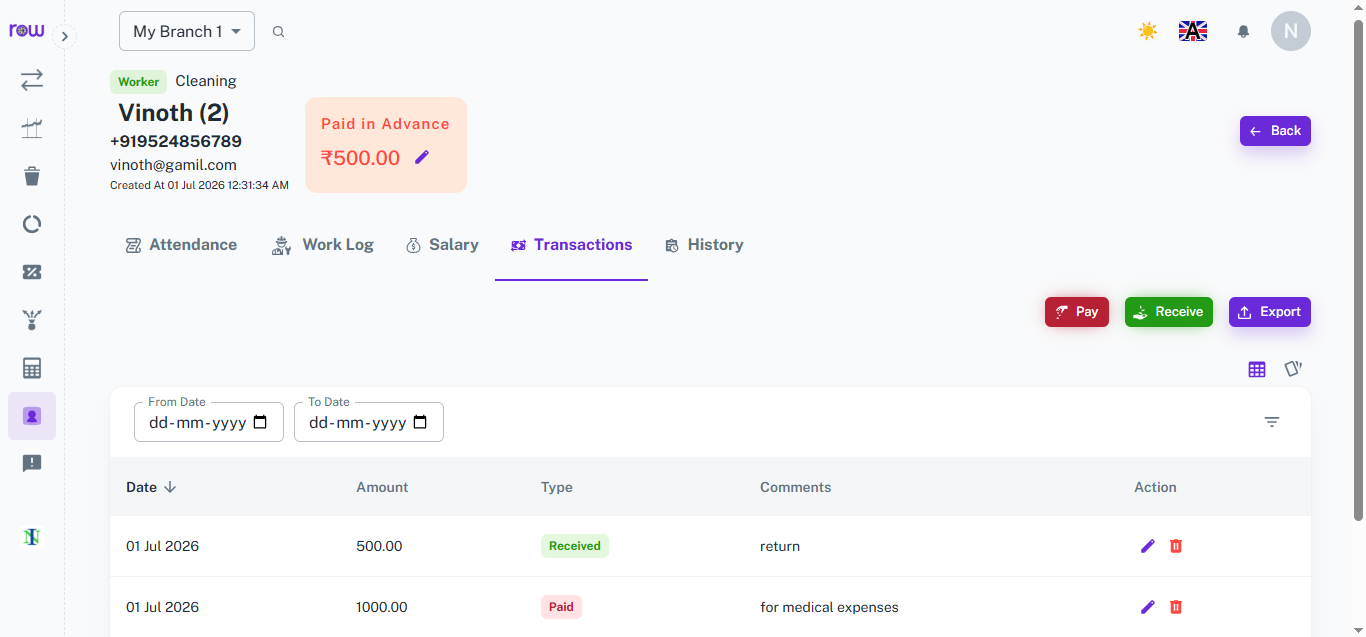
- Combined list of all Paid and Received advance transactions
- Date, amount, type, and comments shown for each entry
- Filter records by date range
- Edit or delete any transaction directly from the list
- Export transaction history anytime
- Current "Paid in Advance" balance always visible at the top
How It Works
- Open the worker's profile and go to the Transactions tab
- View all advance transactions listed by date, newest first
- Check the Type column to see whether it's a Paid or Received entry
- Use From Date and To Date filters to narrow the list
- Click the edit or delete icon on any row to update or remove a transaction
- Click Export to download the transaction list
Workflow
The manager opens the worker's profile and goes to the Transactions tab to view the combined Paid and Received list, filtering by date if needed, and can edit, delete, or export records as required.
Advance Deduction in Salary Calculation
Overview
Any unpaid advance is automatically adjusted against the worker's salary, so there's no manual tracking or separate settlement needed.
Key Highlights
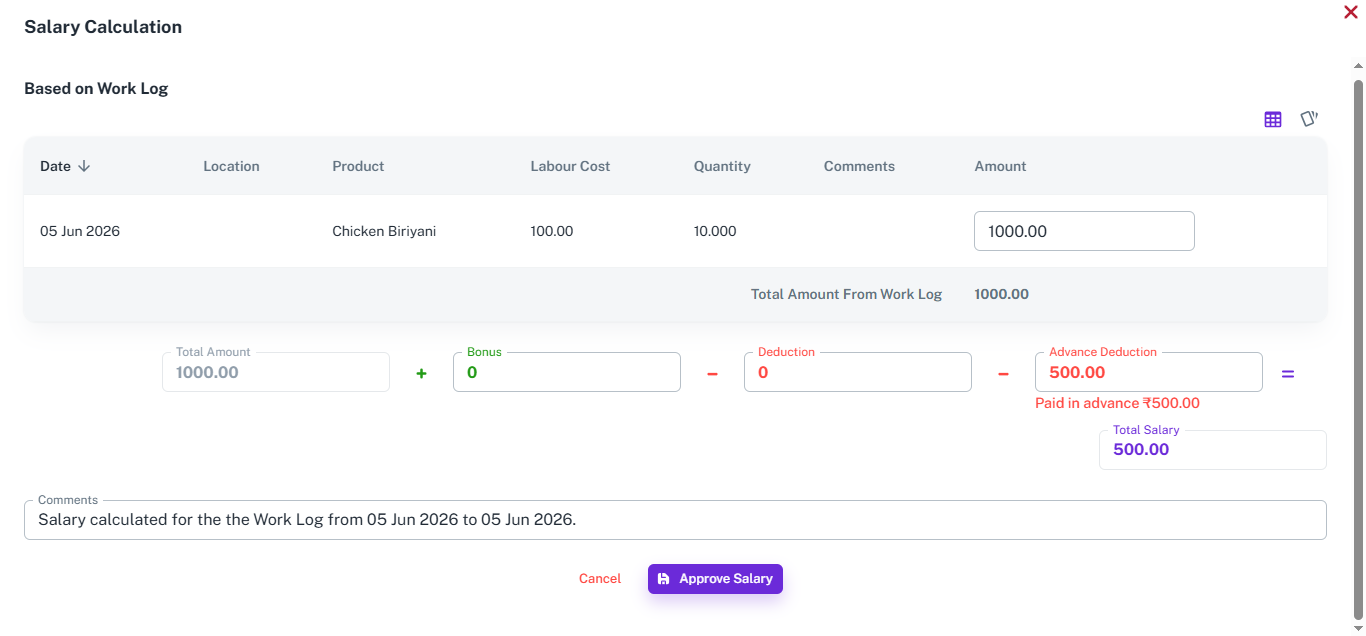
- Outstanding advance auto-detected during salary calculation
- Deduction shown clearly alongside bonus and other deductions
- Final salary auto-adjusted after advance deduction
- Editable comments explaining the calculation
- Applies whether salary is based on attendance or work log
How It Works
- Open Salary Calculation for the worker
- System pulls total earned amount from attendance or work log
- Pending advance balance is fetched automatically
- Advance is deducted along with any bonus or other deductions
- Final salary is displayed with all adjustments applied
- Manager reviews and clicks Approve Salary to confirm
Workflow
The manager opens Salary Calculation, and the system pulls the total earned amount along with any pending advance, deducting it alongside bonus or other deductions to display the final salary — which the manager then approves.
How It Works
1. Advance is requested
An employee requests an advance. The admin or authorized manager reviews the request and decides whether to approve it.
2. Advance is approved and recorded
Once approved, the admin or manager enters the advance amount, date, and installment details into the system. The entry is saved against the employee's profile instantly.
3. Installments are issued if needed
If the advance is to be released in parts, each installment is recorded separately. The system tracks the total advance amount and the amount issued so far — showing the outstanding balance clearly.
4. Recovery at salary time
When salary is processed, the system shows the outstanding advance against the employee. The admin chooses to deduct it automatically from the salary or adjust it manually based on the situation.
5. Advance is cleared
Once the full advance is recovered — either through salary deductions or manual adjustments — the employee's advance balance is cleared. The complete history remains on record.
Workflow
When an employee requests an advance, the admin or authorized manager reviews and approves it. The approved amount is recorded in the system against the employee's profile — either as a single payment or split into multiple installments, each tracked separately. As installments are issued, the system updates the outstanding balance in real time. At salary processing time, the admin can choose to deduct the outstanding advance automatically from the salary or adjust it manually. Once the full amount is recovered, the advance is marked as cleared — with a complete record of every installment issued and every deduction made, accessible at any time.



















