Biometric Attendance
The Biometric Attendance module records your staff's working hours automatically. Employees scan their fingerprint when they arrive and again when they leave — the system logs the exact in time and out time, with no manual entry and no room for error.
Key Highlights of Biometric Attendance
1. Fingerprint Check-In
When an employee arrives for work, they place their finger on the biometric device. The system records their in time instantly — accurate to the second, tied to their profile.
2. Fingerprint Check-Out
When the employee leaves, they scan their fingerprint again. The system records the out time and calculates the total hours worked for that session automatically.
3. Automatic In & Out Time Logging
Every fingerprint scan is stored against the employee's record with the exact date, in time, and out time. No manual entries, no buddy punching, no guesswork.
4. Attendance History
View the full attendance record for any employee — daily in and out times, total hours worked, and attendance patterns — all in one place.
Biometric Attendance Entry
Overview
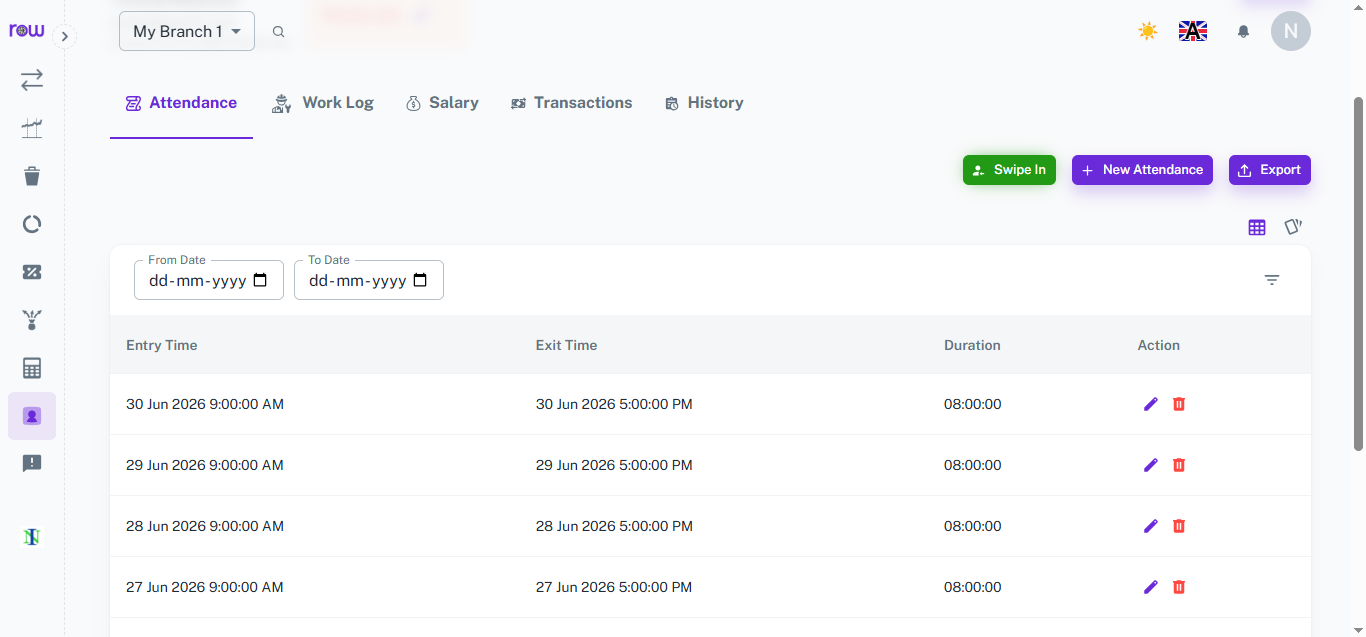
Biometric Attendance automatically records an employee's check-in and check-out time whenever they scan their fingerprint, giving an accurate daily log of their working hours without any manual entry.
Key Highlights
- Fingerprint-Based Entry
- Automatic Entry & Exit Logging
- Duration Calculation
- Editable Records
How It Works
- The employee places their finger on the biometric device to check in.
- The entry time is automatically recorded and updated in the system.
- When the employee checks out, the exit time is captured the same way.
- The system calculates the total duration worked for that day.
- Managers can view, edit, or delete individual attendance entries, or filter records by date range.
Workflow
When an employee arrives for their shift, they scan their fingerprint to check in, and the entry time is logged instantly. At the end of the shift, they scan again to check out, recording the exit time and total duration worked. This data flows directly into attendance history and salary calculations, removing the need for manual tracking.
How It Works
1. Employee arrives at work
The employee places their finger on the biometric device. The system identifies them and records their in time immediately.
2. Employee leaves work
At the end of their shift, the employee scans their fingerprint again. The system records the out time and closes the attendance entry for the day.
3. Attendance is stored automatically
Every scan is saved to the employee's attendance record with the exact date and time — no manual intervention needed from staff or managers.
4. Managers review attendance
Managers can view attendance records for any employee or any date range — in time, out time, and total hours worked — directly from the dashboard.
Workflow
When an employee arrives at work, they scan their fingerprint on the biometric device. The system instantly records their in time against their profile. At the end of the shift, they scan again — the system records the out time and the attendance entry for the day is complete. Managers can review the full attendance log at any time, with exact in and out times for every employee on every working day. This data feeds directly into payroll, ensuring salary calculations are based on accurate, verified working hours.



















