Detailed business reports
Easily view, and manage business reports with dynamic charts, tables, and graphs. Gain the clarity you need to make smarter business decisions.
Transform Your Data into Actionable Insights
Easily track, manage, and analyze your business expenses with smart expense management. Stay organized and make informed financial decisions effortlessly.
Key Features of Business Reporting Solution
1. Interactive Dashboards
Access all your critical business data in one place with real-time interactive dashboards.
2. Comprehensive Tables
Organize and present your data in clean, structured tables for quick reference and detailed insights.
3. Automated Report Generation
Save time by automating the creation of daily, weekly, or monthly reports with just a few clicks.
4. Real-Time Updates
Stay updated with the latest data as reports refresh automatically with real-time syncing.
How It Works
1. Gather Data
Import data from various sources such as sales, expenses, customer interactions, and more.
2. Generate Visual Reports
Use charts, tables, and graphs to create visual summaries that make your data easy to understand.
3. Analyze and Act
Leverage clear insights to identify opportunities, solve problems, and optimize performance.
Sales Dashboard
Overview
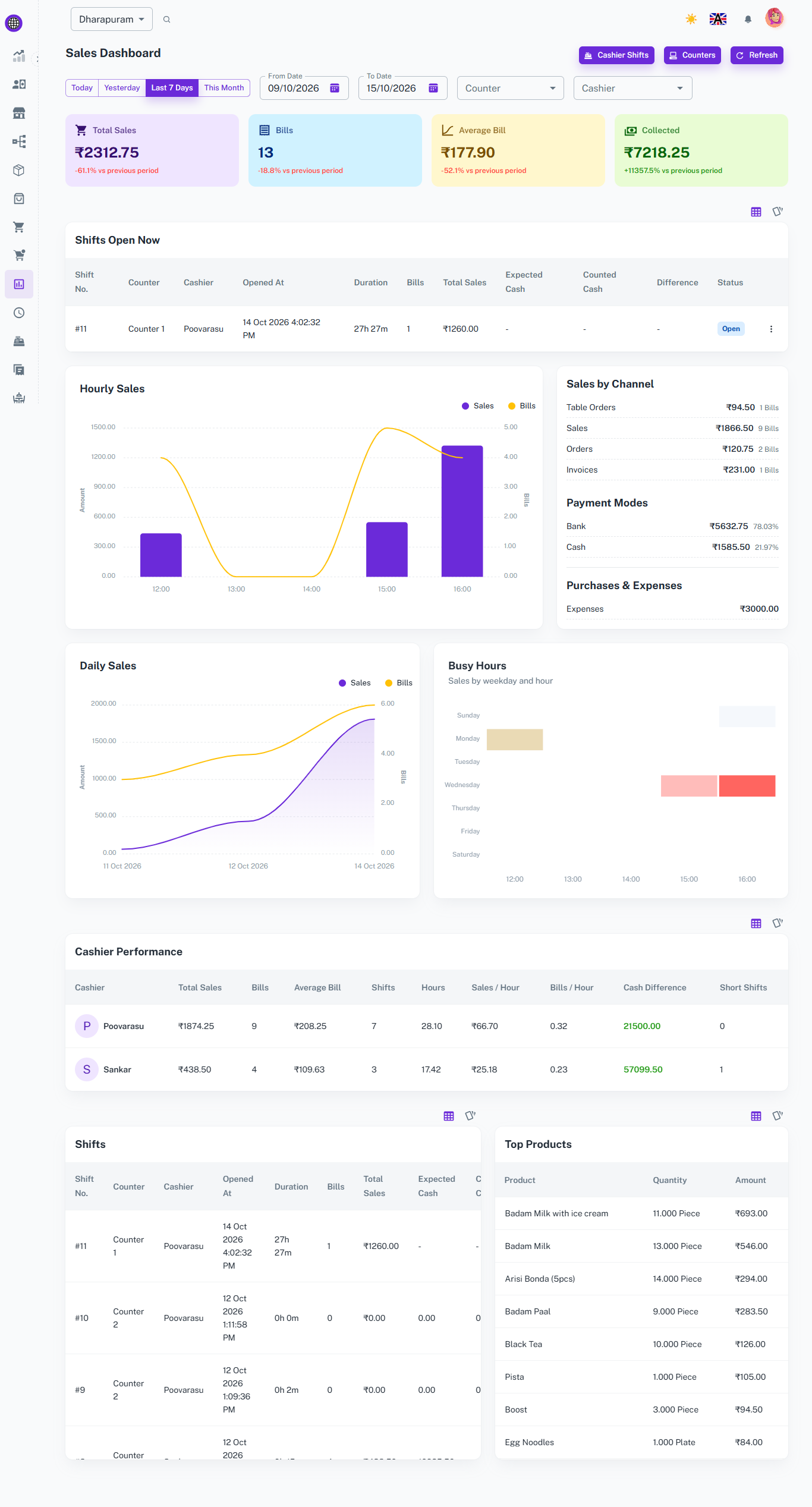
The Sales Dashboard gives a clear view of your sales performance through KPI cards, charts, and tables. Filter by date, counter, or cashier to see what is selling, when it sells, and how each cashier is performing.
Key Features
-
Today Sales Summary
-
Shows Today's Sales, Bills, Average Bill, and Collected amount.
-
Also shows the payment methods used for today's sales and current shifts. Click on it to view the full sales details in the Sales Dashboard.
-
-
Sales Summary Cards
-
Shows Total Sales, Bills, Average Bill, and Collected amount for the selected period.
-
Compares each figure with the previous period so you can see growth or decline at a glance.
-
-
Hourly and Daily Sales
-
Charts show your sales amount and bill count by hour and by day.
-
Compare with an earlier period to understand revenue growth and trends.
-
-
Busy Hours
-
Shows sales by weekday and hour in a simple heat map.
-
Helps you plan staff and stock for your peak hours.
-
-
Sales by Channel
-
Breaks sales down into Sales, Orders, and Invoices.
-
Shows the amount and number of bills for each channel.
-
-
Payment Modes
-
Shows how much was collected by Cash, Bank, and other payment modes.
-
Displays the percentage share of each mode to understand how customers prefer to pay.
-
-
Purchases and Expenses
-
Displays the total purchases and expenses for the selected period right next to your sales.
-
-
Cashier Performance
-
Compare cashiers by total sales, bills, average bill, shifts, hours, and sales per hour.
-
Track cash difference and short shifts to spot mismatches in cash handling.
-
-
Shift Reports
-
Lists each shift with its counter, cashier, opening time, duration, bills, and total sales.
-
Compares expected cash with counted cash, so every shift is checked.
-
-
Top Products
-
Shows the best selling products by quantity and amount.
-
Provides useful data to plan stock and promotions around what customers buy most.
-

Business Reports
Overview
The Business Reports Module provides a comprehensive overview of business performance through visual graphs, lists, and actionable insights. This module is prominently displayed on the main dashboard, giving users an at-a-glance understanding of key metrics.
Key Features
-
Total Numbers
-
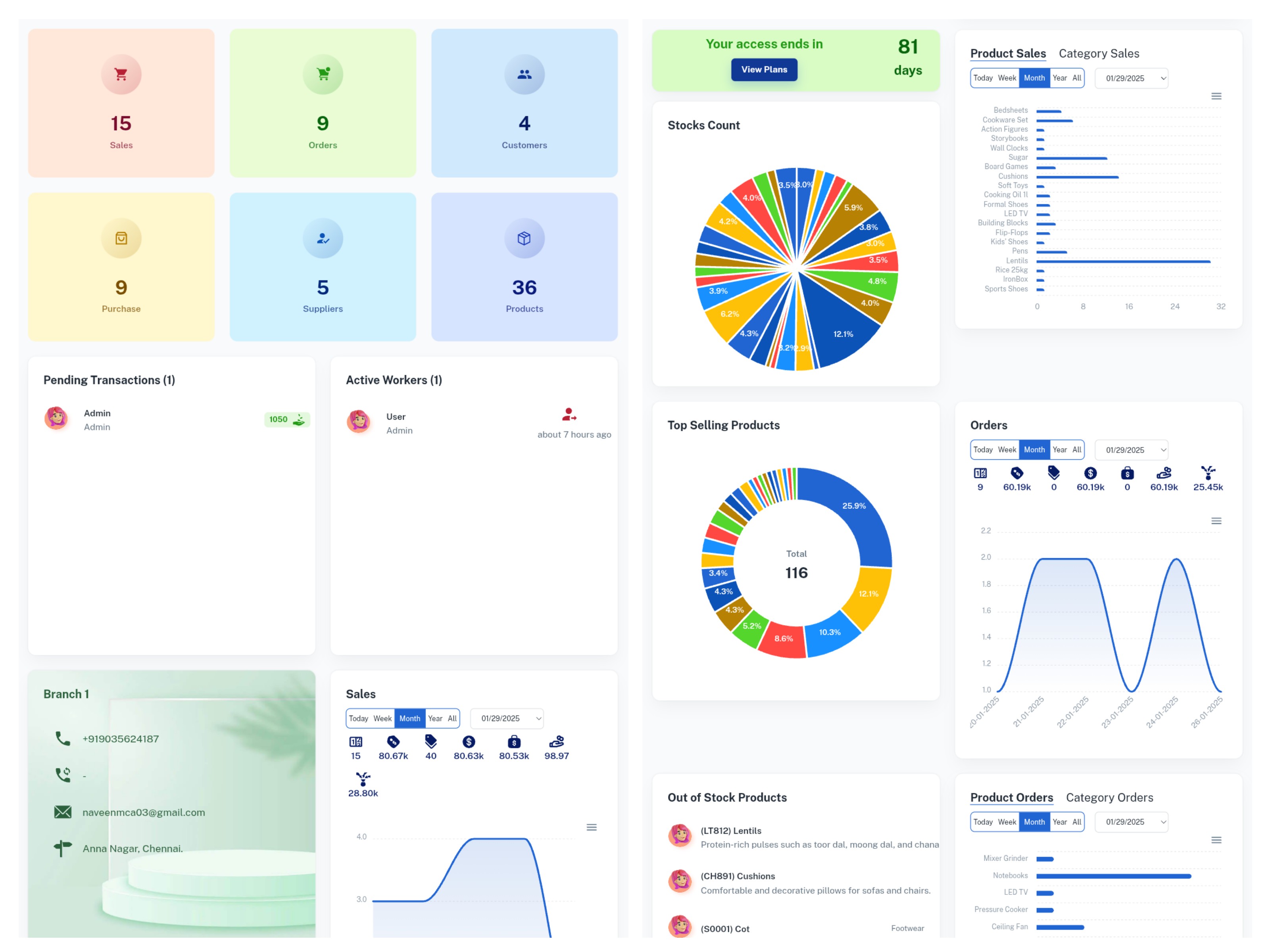
The total number of sales, orders, customers, purchases, suppliers, and products of the branch is displayed on the dashboard.
-
-
Active workers and Pending Transactions
-
Total active workers of the branch and their swipein time is there.
-
You can view the list of pending transactions of the users.
-
-
Sales Graph
-
Tracks daily, weekly, monthly, and yearly sales trends.
-
Offers insights into revenue growth and seasonal patterns.
-
-
Stock Count
-
Displays the total count of current stock levels.
-
Identifies low or critical stock levels requiring attention.
-
-
Top Selling Products
-
Highlights the most popular products based on sales.
-
Provides actionable data to optimize inventory and marketing strategies.
-
-
Orders Graph
-
Visualizes the volume of completed orders over time.
-
-
Pending Bills List
-
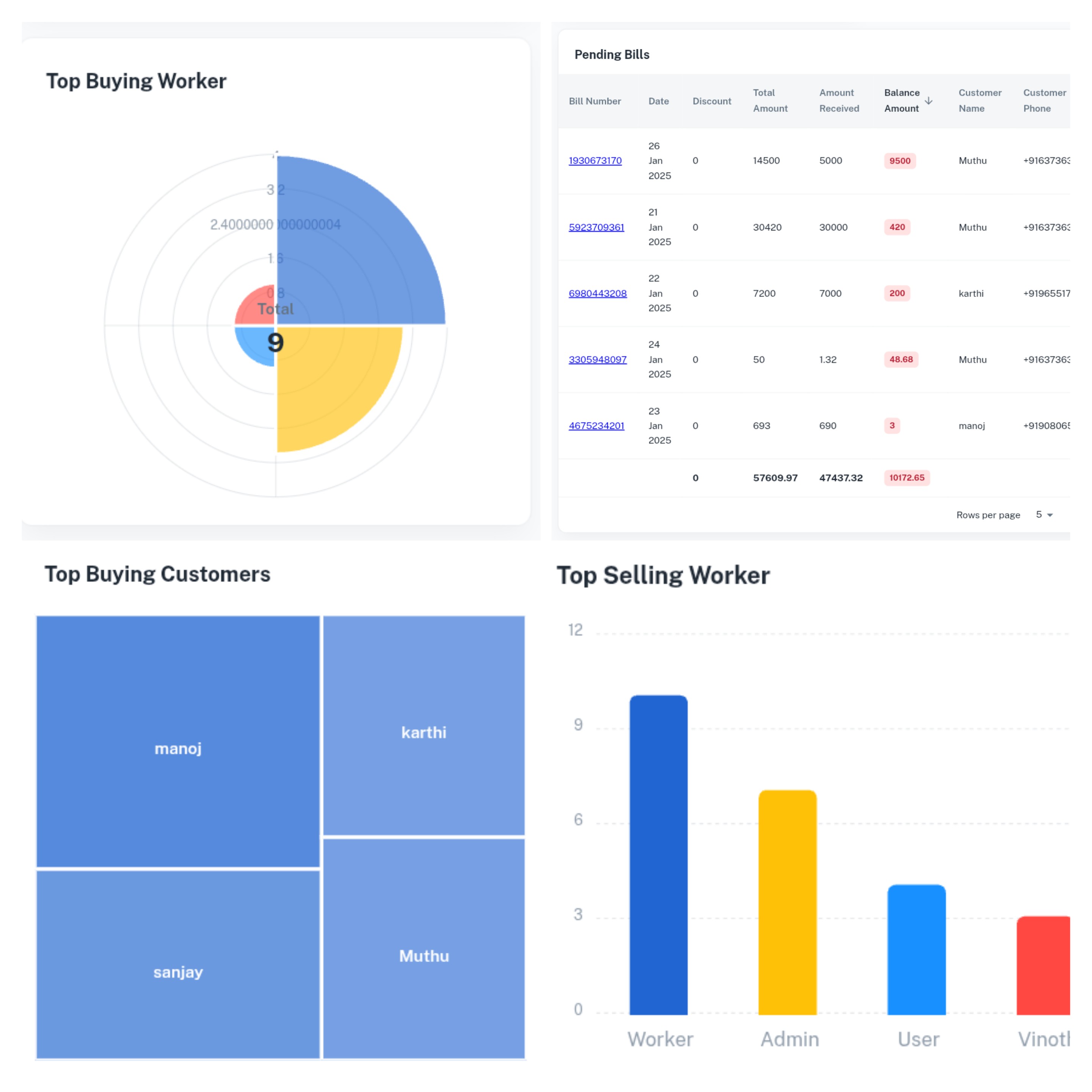
Displays a list of unpaid bills.
-
Provides bill details like customer/Supplier name, amount for follow-ups.
-
-
Pending Orders List
-
Displays a list of not delivered orders.
-
Provides bill details like order bill number, stage, customer name for follow-ups.
-
-
Pending Inward Transfers
-
After creating a transfer, the "Pending Inward Transfers" section in the TO location dashboard lists the transfer with an Approve option.
-
Once the product is received and verified from the FROM location, you can click the Approve button.
-
Advanced Insights and Analytics
Overview
Highlights the advanced analytical features of the Business Reports Module, offering detailed insights to drive better decision-making.
Key Features
-
Out of Stock Products List
- Lists products currently out of stock.
- Helps ensure timely replenishment to avoid lost sales.
-
Top Buying Customers Graph
-
Displays the customers contributing the most revenue.
-
Allows businesses to identify and reward loyal customers.
-
-
-
Highlights staff members with the highest sales performance.
-
Encourages healthy competition and performance recognition.
-
-
Customizable Reporting Periods
-
Generate graphs for specific timeframes (e.g., daily, weekly, monthly).
-
Compare trends across different periods for better forecasting.
-
Advanced Insights and Analytics of All Branches
Overview
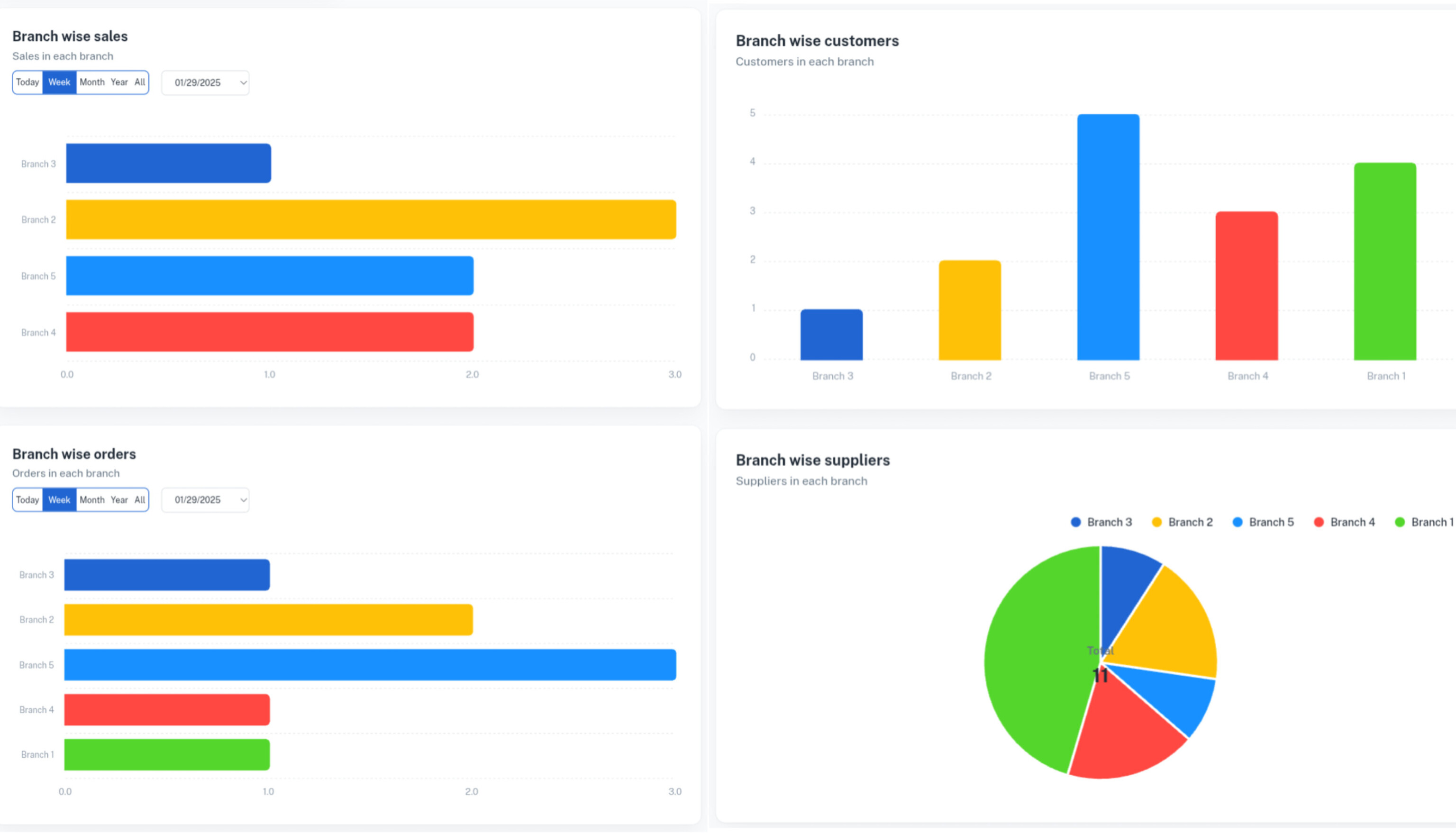
Highlights the advanced analytical features like Branch wise sales, Branch wise orders offering detailed insights to drive better decision-making.
Key Features
-
Branch wise sales
- Tracks daily, weekly, and monthly total sales of all branches.
-
Branch wise orders
- Tracks daily, weekly, and monthly total Orders of all branches.
Overall Features of the Business Reports
-
Centralized Data Insights
-
Combines multiple performance metrics into a single, user-friendly dashboard.
-
Offers a holistic view of business health.
-
-
Visual and Interactive Graphs
-
Displays key performance indicators like sales trends, top products, and staff performance through engaging and interactive graphs
-
Clickable graphs for deeper drill-downs into data.
-
-
Real-Time Updates
-
All reports and metrics are updated in real time, ensuring the latest data is always displayed.
-
Transform the Way You Manage Finances
Our accounting management tools are built to help you streamline your financial operations, reduce manual effort, and focus on growing your business.




















+91 9035624187