CRM
The CRM module keeps all your customer relationships in one place. Maintain detailed customer profiles, track follow-ups, send WhatsApp messages, and push notifications for offers and bills — all managed by the admin or authorized managers. Stay connected with every customer without letting anyone slip through the cracks.
Key Highlights of CRM
1. Customer Profiles
Every customer has their own profile in the system — name, contact details, and a full history of interactions. All your customer data is organized, searchable, and always up to date.
2. Follow-Ups
Log follow-up actions against any customer. Managers can record what was discussed, what needs to happen next, and when to follow up — so no customer conversation is ever forgotten or missed.
3. WhatsApp Marketing
Reach customers directly through WhatsApp from within the system. Send messages for follow-ups, confirmations, or any customer communication — all tracked against the customer's profile.
4. Email Marketing
Reach customers directly through email from within the system. Send personalized emails for promotions, follow-ups, updates, or any customer communication — all tracked against the customer's profile.
5. SMS Marketing
Connect with customers instantly through SMS from within the system. Send messages for promotions, reminders, confirmations, follow-ups, or important updates — all tracked against the customer's profile.
6. Offer Notifications
Send notifications to customers about offers, promotions, or deals. Reach your entire customer base or a specific group — keeping your customers informed and engaged with your business.
7. Bill Notifications
Send bill details or payment reminders directly to customers via notification. Customers receive their bill information instantly — reducing follow-up calls and improving payment turnaround
8. Role-Based Access
Only the admin and managers with permission granted by the admin can access and manage CRM data. Customer information stays secure and handled by the right people.
New Customer
Overview
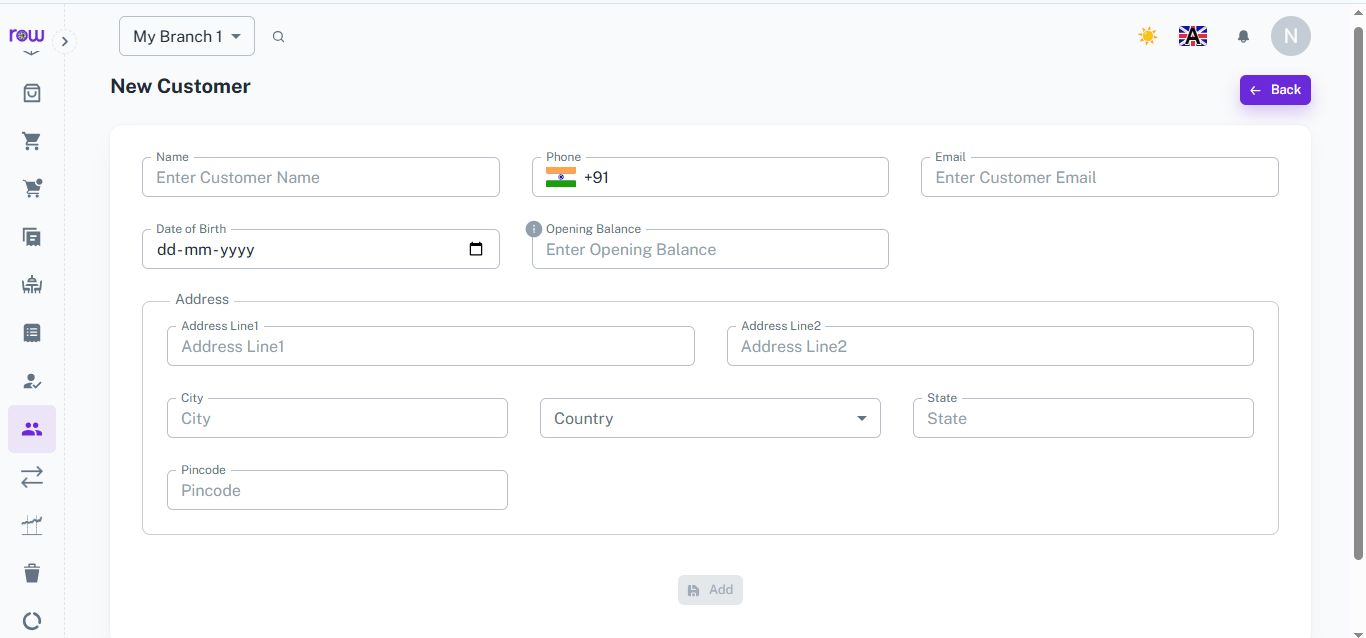
The New Customer form lets you quickly create a customer profile with their contact details and address, so every future order or bill can be linked to them.
Key Highlights
- Basic Details
- Opening Balance
- Address Details
How It Works
- Enter the customer's name, phone number, and email.
- Add their date of birth and opening balance if applicable.
- Fill in the address — Address Line 1, Address Line 2, city, country, state, and pincode.
- Click Add to save the customer profile.
Workflow
When a new customer visits or places an order, the manager opens New Customer, fills in their details and address, and saves the profile. The customer is now available across the system for billing, orders, and CRM activities.
Customer List
Overview
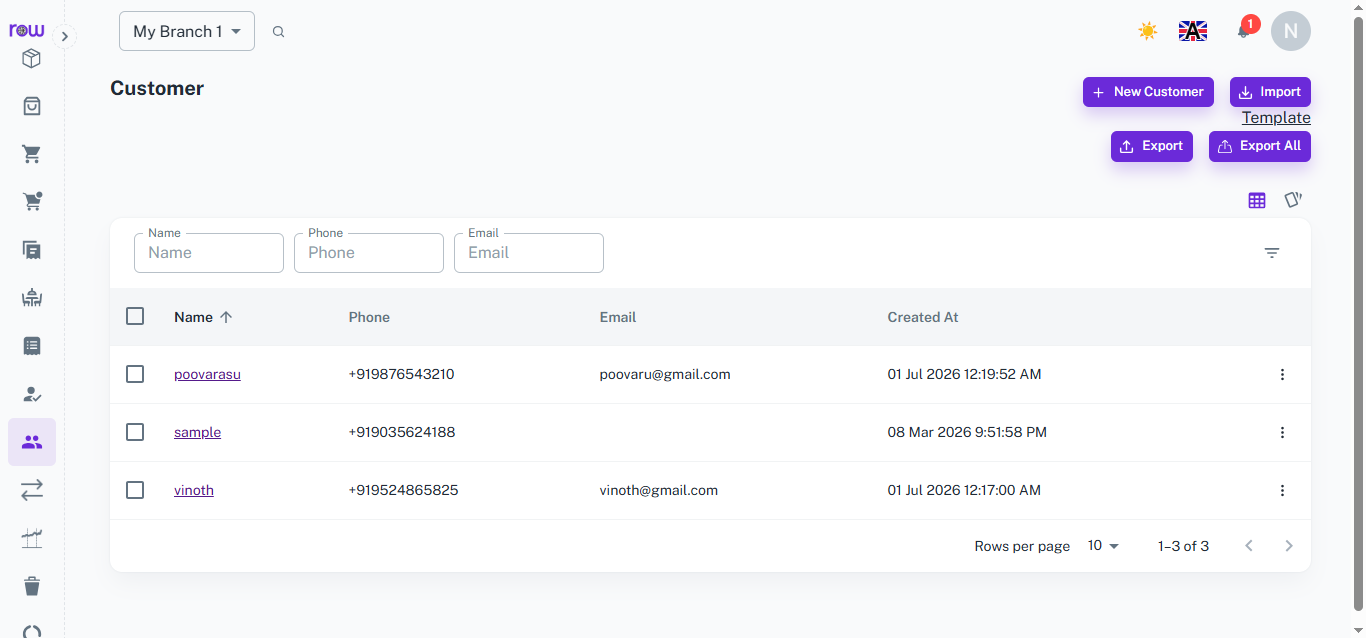
The Customer List gives a complete view of all registered customers in one place, with quick search, import, and export options for easy management.
Key Highlights
- Search & Filter
- Import Customers
- Export Customers
- Quick Access to Profiles
How It Works
- View all customers with their name, phone, email, and creation date.
- Search or filter customers using name, phone, or email fields.
- Click New Customer to add a customer directly from the list.
- Use Import with the provided template to add customers in bulk.
- Use Export or Export All to download customer data.
- Click on any customer name to open their detailed profile.
Workflow
The manager opens the Customer List to view all saved customers. New customers can be added individually or imported in bulk, while existing data can be exported anytime for reporting or backup.
Customer Profile
Overview
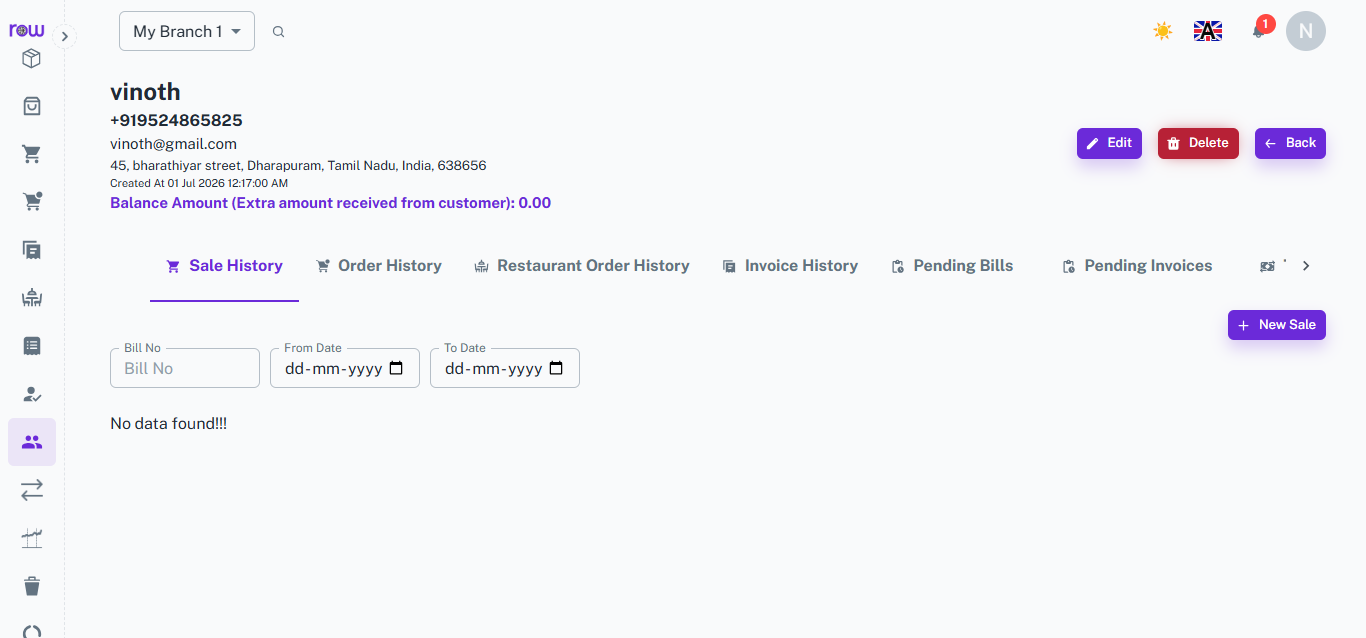
The Customer Profile page brings together everything about a customer — their details, balance, and complete transaction history — in one unified view.
Key Highlights
- Customer Details
- Balance Amount
- Sale & Order History
- Pending Bills & Invoices
How It Works
- View the customer's name, phone, email, address, and account creation date.
- Check the balance amount reflecting any extra amount received from the customer.
- Browse through tabs — Sale History, Order History, Restaurant Order History, Invoice History, Pending Bills, and Pending Invoices.
- Filter records using Bill No, From Date, and To Date.
- Start a New Sale directly from the profile page.
- Edit or delete the customer profile as needed.
Workflow
When a manager needs customer history or wants to start a new sale for a returning customer, they open the customer's profile, review past transactions and pending dues, and proceed with billing directly from the same screen.
How It Works
1. Customer profile is created
The admin or manager creates a customer profile — entering their name, contact number, and any other relevant details. The profile is saved and ready to use immediately.
2. Follow-ups are logged
After any customer interaction, the manager logs a follow-up note against the customer's profile — recording what was discussed and what action needs to be taken next.
3. WhatsApp message is sent
When a customer needs to be contacted, the manager sends a WhatsApp message directly from the system. The communication is tracked against the customer's profile for future reference.
4. Offer notifications are sent
When a new offer or promotion is running, the admin or manager sends a notification to selected customers or the entire customer base — directly from the CRM.
5. Bill notifications are sent
Once a bill is generated, a notification is sent to the customer with the bill details. Payment reminders can also be sent for any outstanding amounts.
Workflow
The admin or manager creates a customer profile with their contact details and saves it to the system. After every interaction, a follow-up note is logged against the profile — recording what was discussed and what needs to happen next. When a customer needs to be contacted, a WhatsApp message is sent directly from the CRM and tracked against their profile. When offers or promotions are running, notifications are pushed to selected customers or the full customer base in one action. Once bills are generated, customers receive their bill details via notification — and payment reminders can be sent for any outstanding amounts. Every interaction, message, and notification is stored against the customer's profile — giving managers a complete, clear picture of every customer relationship.
WhatsApp Marketing
The WhatsApp Marketing module helps businesses communicate directly with customers and suppliers through WhatsApp. Send template-based messages to multiple recipients, create reusable message templates, receive customer replies, track failed messages, and maintain a complete communication history from one centralized platform.
Key Highlights of WhatsApp Marketing
1. Send Bulk Messages
Send WhatsApp messages to selected customers or suppliers using approved templates, with support for selecting up to 30 recipients at a time.
2. Create Message Templates
Create reusable WhatsApp templates with customizable headers, body content, footers, languages, categories, quick replies, and call-to-action options.
3. Track Incoming Messages
View replies and incoming WhatsApp messages from customers and suppliers directly from the system.
4. Monitor Failed Messages
Identify messages that failed to send and view their status and error information for easy troubleshooting.
5. Complete Message History
Maintain a complete history of WhatsApp communication, including sent messages, received messages, templates used, status, and activity dates.
Send Messages
Overview
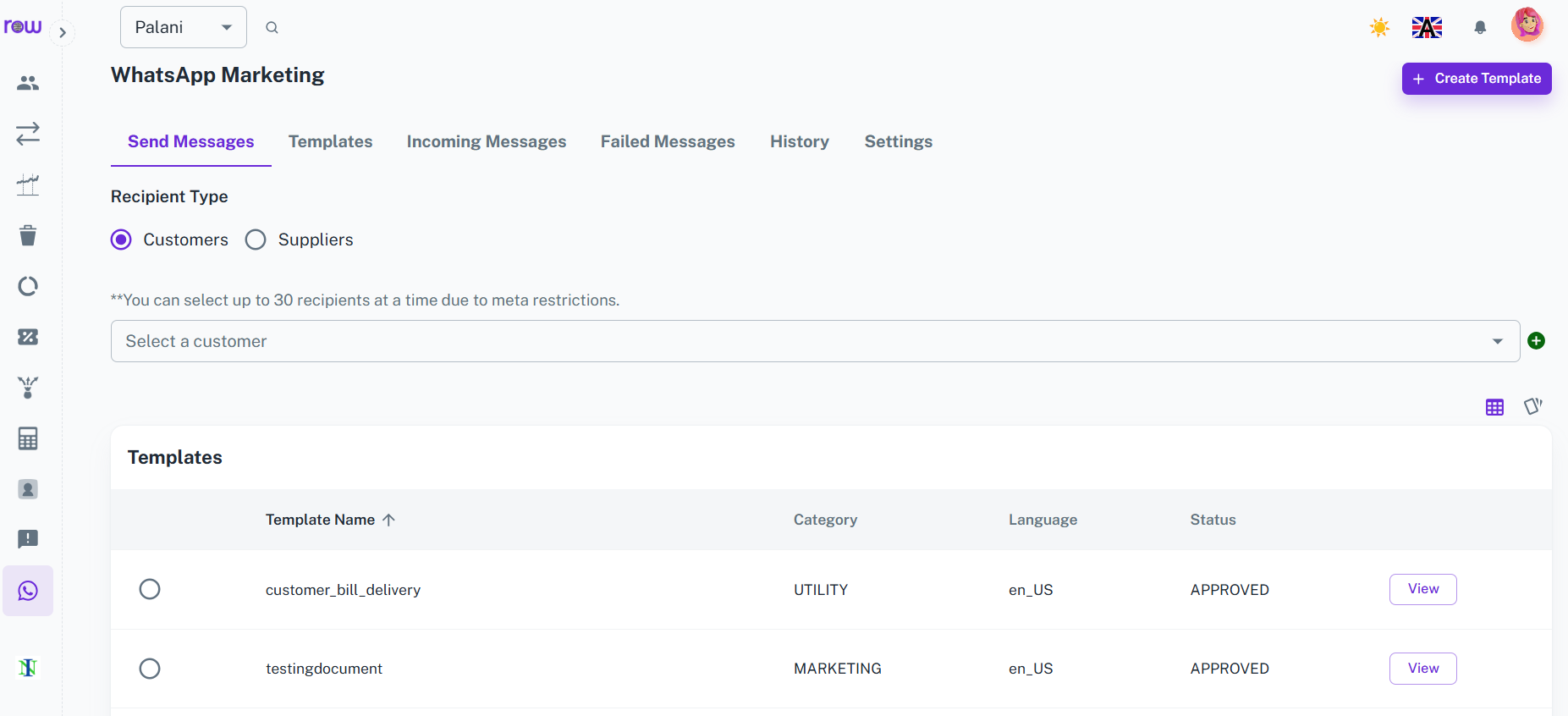
Send WhatsApp messages directly to customers or suppliers using predefined message templates. Select multiple recipients, choose the required template, and send messages from a single screen.
Key Highlights
- Send messages to customers
- Send messages to suppliers
- Select up to 30 recipients at a time
- Use predefined WhatsApp templates
- Send messages to multiple recipients
- Track message delivery status
How It Works
- Select the recipient type – Customer or Supplier.
- Select the required recipients.
- Choose the WhatsApp message template.
- Review the message details.
- Click Send to deliver the message.
Workflow
The user selects customers or suppliers, chooses up to 30 recipients, selects the required WhatsApp template, and sends the message. The system processes the messages and records their status for future tracking.
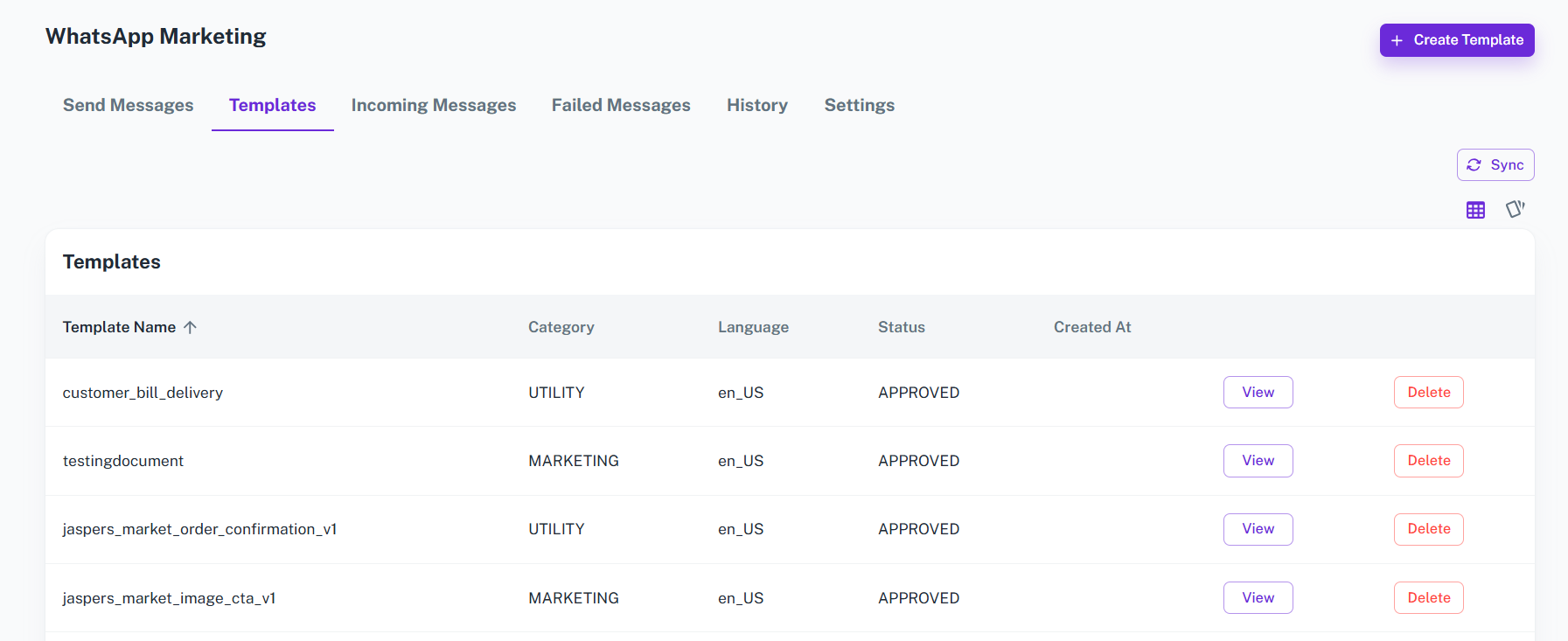
Templates
Overview
Create and manage reusable WhatsApp message templates for marketing, notifications, reminders, and other business communication. Templates help maintain consistent messaging and simplify repeated communication.
Key Highlights
- Create reusable message templates
- Define template name and category
- Select template language
- Configure message header
- Create customizable message body
- Add footer content
- Use variables for dynamic content
- Add Quick Reply and Call To Action options
- Preview templates before creation
How It Works
- Enter the Template Name.
- Select the Category.
- Choose the Language.
- Select the Header Type if required.
- Enter the message Body.
- Add Footer content if required.
- Configure Quick Reply or Call To Action options if needed.
- Review the Template Preview.
- Click Create to save the template.
Workflow
The user creates a WhatsApp template by defining its name, category, language, header, body, and footer. Dynamic variables and action buttons can be added when required. After reviewing the preview, the template is created and can be used when sending messages to customers or suppliers.
Incoming Messages
Overview
View incoming WhatsApp messages and replies received from customers and suppliers. The Incoming Messages section provides a centralized place to monitor responses and customer communication.
Key Highlights
- View customer replies
- View supplier replies
- Track sender name and phone number
- View message type and content
- Monitor message status
- Track received date and time
How It Works
- Open Incoming Messages.
- View messages received from customers or suppliers.
- Review the sender's name and phone number.
- View the received message and its status.
- Use the information for further communication or follow-up.
Workflow
When customers or suppliers reply to WhatsApp messages, their responses appear in the Incoming Messages section. Users can review the sender, message content, status, and received time to manage communication and follow-ups efficiently.
Failed Messages
Overview
Monitor WhatsApp messages that could not be successfully delivered. View recipient details, templates, failure status, and error information to identify and resolve communication issues.
Key Highlights
- View all failed messages
- Identify affected recipients
- View recipient phone numbers
- Track the template used
- View failure status
- Review error information
- Track failure date and time
How It Works
- Open Failed Messages.
- View messages that failed to send.
- Check the recipient and phone number.
- Review the template and message status.
- Check the error information to identify the reason for failure.
Workflow
If a WhatsApp message fails to send, the system records it in the Failed Messages section. Users can review recipient information, message status, template details, and error information to understand the failure and take the required action.
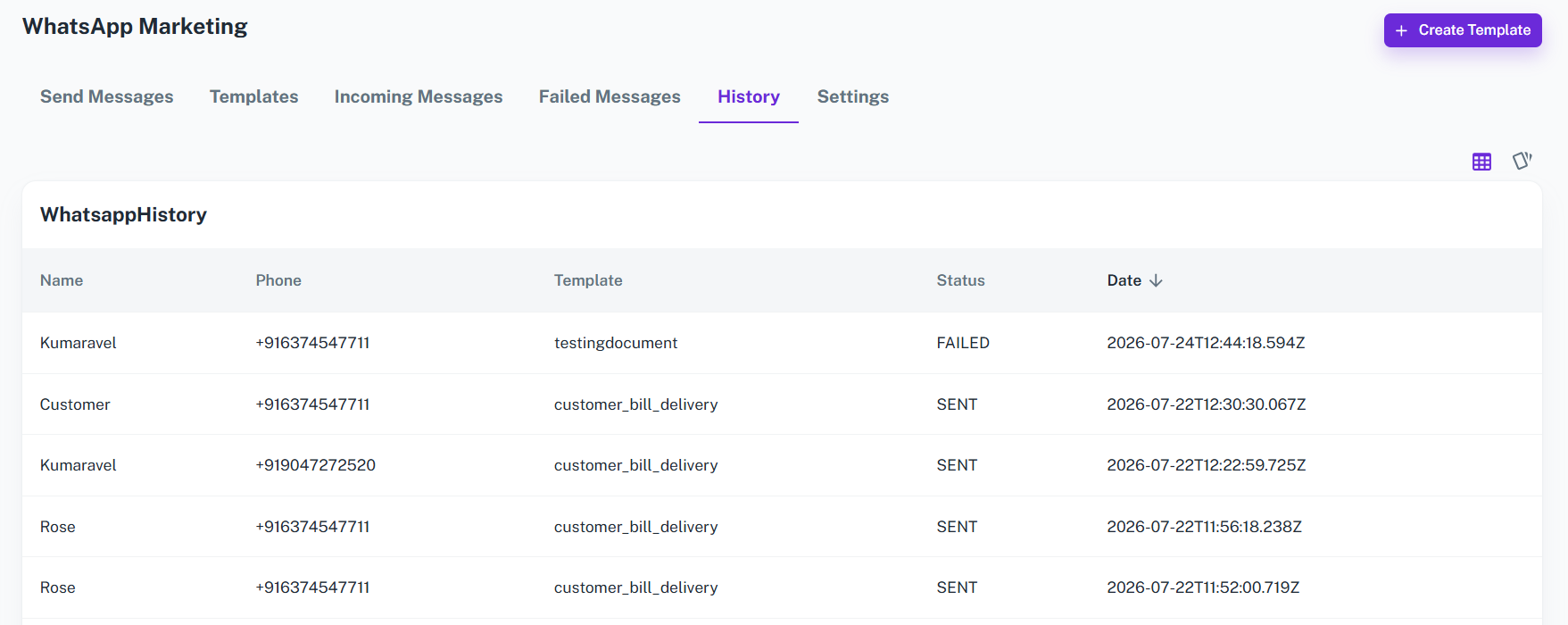
WhatsApp History
Overview
Maintain a centralized history of WhatsApp communication and activities. Review previous messages and communication records to understand when and how customers and suppliers were contacted.
Key Highlights
- View WhatsApp communication history
- Track sent messages
- Track received messages
- Review templates used
- View recipient information
- Monitor message status
- Track communication dates
How It Works
- Open the History section.
- Browse previous WhatsApp communication.
- View recipient details and phone numbers.
- Review the template or message information.
- Check message status and activity date.
Workflow
The system maintains WhatsApp communication records so users can review previous interactions with customers and suppliers. This provides a clear history of messaging activities and helps businesses track communication and follow-ups from one place.
Email Marketing
The Email Marketing module helps businesses communicate with customers directly through email. Select customers, design professional email content, and send offers, announcements, reminders, or business updates from a single platform.
Key Highlights of Email Marketing
1. Select Customers
Choose the customers you want to send emails to.
2. Design Emails
Create and customize professional email content based on your requirements.
3. Send Emails
Send designed emails directly to selected customers from the system.
4. Customer Communication
Keep customers informed about offers, announcements, reminders, new products, services, and important business updates.
Send Email
Overview
Create and send customized emails directly to selected customers. Add a subject, design the email content, review the message, and send it from one place.
Key Highlights
- Select customers
- Add email subject
- Design email content
- Customize the message
- Send emails to selected customers
- Share offers and business updates
How It Works
- Select the Customers.
- Enter the Email Subject.
- Design the Email Content.
- Review the email.
- Click Send to deliver the email to the selected customers.
Workflow
The user selects the customers, enters the email subject, designs the required email content, and reviews the message. Once ready, the email is sent directly to the selected customers, making business communication simple and efficient.
SMS Marketing
The SMS Marketing module helps businesses communicate with customers quickly through text messages. Select customers, create your message, and send SMS campaigns directly from a single platform.
Key Highlights of SMS Marketing
1. Select Customers
Choose the customers you want to reach through SMS.
2. Create SMS Messages
Enter the required promotional, informational, reminder, or announcement message.
3. Send SMS
Send the SMS directly to the selected customers.
4. Quick Customer Communication
Reach customers instantly with short and direct business messages.
Send SMS
Overview
Send SMS messages directly to selected customers for promotions, reminders, announcements, and other business communication.
Key Highlights
- Select customers
- Create SMS content
- Send messages to selected customers
- Communicate quickly with customers
- Support marketing and business notifications
How It Works
- Select the Customers.
- Enter the SMS Message.
- Review the message.
- Click Send to deliver the SMS.
Workflow
The user selects the target customers, enters the SMS content, reviews the message, and sends it directly to the selected customers.



















