Delivery App Pricing
Price smarter on delivery apps with Run On Web. Understand commissions and fees, see what each item really earns, and list the price that protects your margin.
Delivery App Pricing Made Simple
Delivery apps take a commission and fees on every order, so selling at your counter price can quietly turn a profit into a loss. With our website, you gain access to a robust pricing solution designed to show what each item really earns on every app, and the exact app price to list to protect your margin.
Key Features
1. Delivery App Terms
Enter each app’s commission, fees, and packaging from your contract once, and they are saved for your whole business.
2. Real Profit on Every Item
See what each item earns on the app at your counter price, compared with what it earns in your shop.
3. Suggested App Price
Get the app price that protects your margin, calculated with all the commission and fees of that app.
Set Up Delivery App Pricing in Just 3 Simple Steps:
1. Add Your Delivery App
Select an app such as Zomato or Swiggy, or click the 'Add app' button to create a new one.
2. Enter the App Terms
Fill in the commission, fees, and packaging from your contract and click save.
3. List at the Suggested Price
Open the menu prices, check what each item earns, and list the suggested app price to complete.
Delivery Apps
Overview
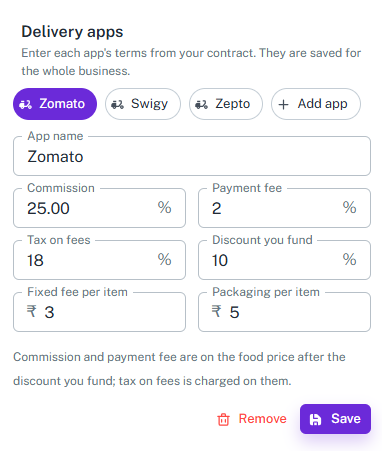
The Delivery Apps section lets you enter the terms of each delivery app from your contract. The terms are saved for the whole business, so every price on that app is calculated with them.
Key Features
-
Delivery App Tabs
-
Add each delivery app you sell on, such as Zomato or Swiggy, with the Add app button.
-
Switch between your apps using tabs, and remove an app you no longer use.
-
-
App Terms Form
- App Name
- Commission % (Charged on the food price after the discount you fund.)
- Payment Fee % (Charged on the food price after the discount you fund.)
- Tax on Fees % (Tax charged on the commission and payment fee.)
- Discount You Fund % (The part of the app discount that you pay for.)
- Fixed Fee per Item
- Packaging per Item
-
Saved for Your Business
-
Enter the terms from your contract once, and they are saved for the whole business.
-
Update the terms with Save whenever your contract changes.
-
Quick Check
Overview
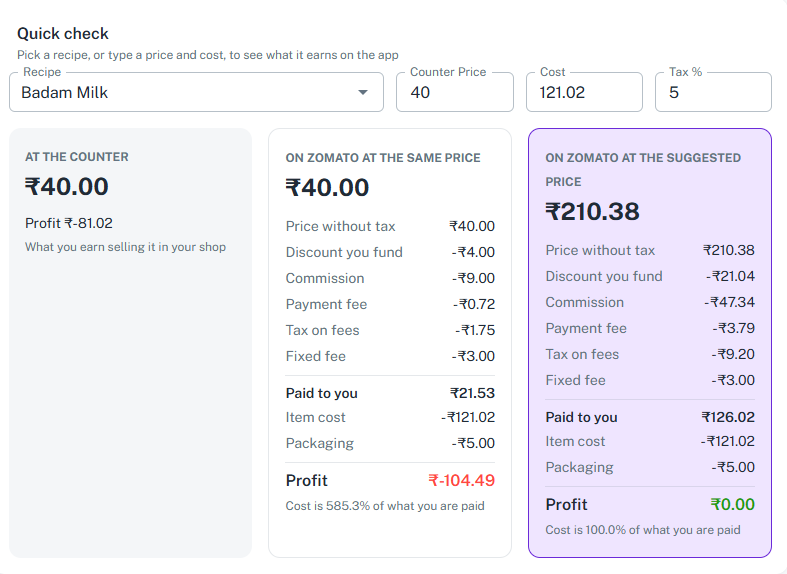
Quick Check shows what an item earns at your counter and on the app, side by side. Pick a recipe, or type a price and cost, and see the result instantly.
Key Features
-
Quick Check Form
- Recipe (Pick a recipe, or type a price and cost yourself.)
- Counter Price
- Cost
- Tax %
-
Three-Way Comparison
-
At the Counter: your selling price and the profit you earn selling it in your shop.
-
On the App at the Same Price: what the app pays you after commission and fees, and your profit.
-
On the App at the Suggested Price: the app price that keeps your margin, with the full breakdown.
-
-
Full Fee Breakdown
-
Shows the price without tax, commission, fixed fee, and the amount paid to you.
-
Shows the item cost and the final profit, so you see exactly where the money goes.
-
Tells you what share of what you are paid goes to item cost.
-
Menu Prices on the App
Overview
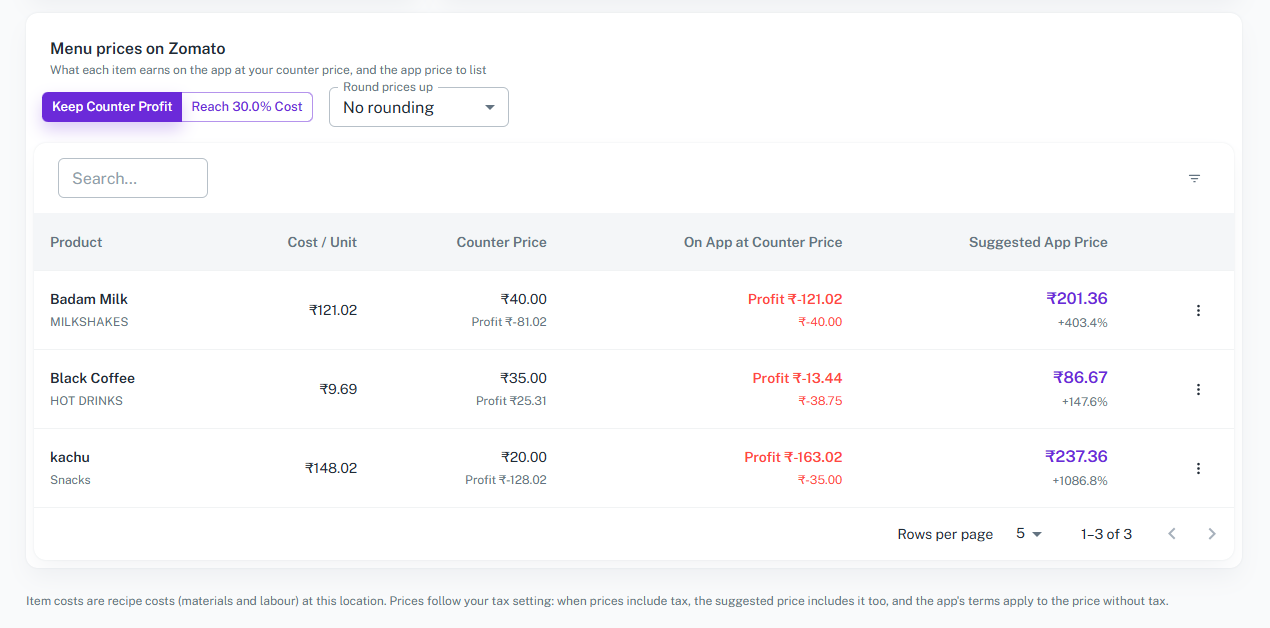
Menu Prices shows every item on your menu with what it earns on the app at your counter price, and the app price you should list. Choose how the price is calculated and list with confidence.
Key Features
-
Menu Price Table
-
Lists every product of your menu with its category.
-
Columns include: Product, Cost / Unit, Counter Price, On App at Counter Price, and Suggested App Price.
-
Shows the profit at each price, and how much higher the suggested app price is than your counter price in %.
-
-
Pricing Method
-
Keep Counter Profit: get the app price that earns you at least the profit you make at your counter.
-
Reach Target Cost %: get the app price at which the item cost is your target share of what the app pays you.
-
Round Prices Up: round the suggested prices up so they are easy to list on the app.
-
-
Search and Browse
-
Search the menu to find any item quickly.
-
Browse the list page by page, with a choice of rows per page.
-
-
Cost and Tax Aware
-
Item costs are your recipe costs, including materials and labour, at your location.
-
The app’s terms are applied to the price without tax, and the suggested price follows your tax setting.
-
Overall Features of the Delivery App Pricing Module
-
Complete Delivery App Management
-
Record the terms of every delivery app you sell on, including commission, fees, and packaging.
-
Terms are saved once for the whole business, accessible anytime.
-
-
Automated Calculations
-
Automatically calculate commission, fees, tax on fees, and the amount paid to you.
-
Reduces manual errors and ensures accuracy.
-
-
Real-Time Insights
-
See the real profit or loss of every item on every app.
-
Know the right app price to protect your margin and avoid selling at a loss.
-
Why Choose Us?
Our delivery app pricing system is user-friendly, scalable, and
designed to meet the unique needs of businesses of all sizes.
Whether you sell on one delivery app or on many, our solution
helps you stay in control of your margins and your profit.
Start pricing your menu smarter and faster today. Explore the
features and tools on our website and take the first step toward
profitable delivery sales.



















