Devices
The Device Management module helps financial institutions register, assign, and monitor the mobile devices used by field agents for loan collection. Track device information, assign devices to collection agents, monitor app versions, and manage trusted devices to ensure secure and efficient field operations.
Key Highlights of Device Management
1. Register Collection Devices
Register the mobile devices used by field agents by recording the device ID, device type, operating system, and app version.
2. Assign Devices to Field Agents
Link each registered device to a specific field agent for secure and accountable loan collection activities.
3. Monitor Device Information
Track device type, OS version, application version, and device status from a centralized dashboard.
4. Trusted Device Management
Identify trusted devices and monitor blocked or inactive devices to improve security.
5. Centralized Device Dashboard
View, search, filter, and manage all registered collection devices from a single dashboard.
Create Device
Overview
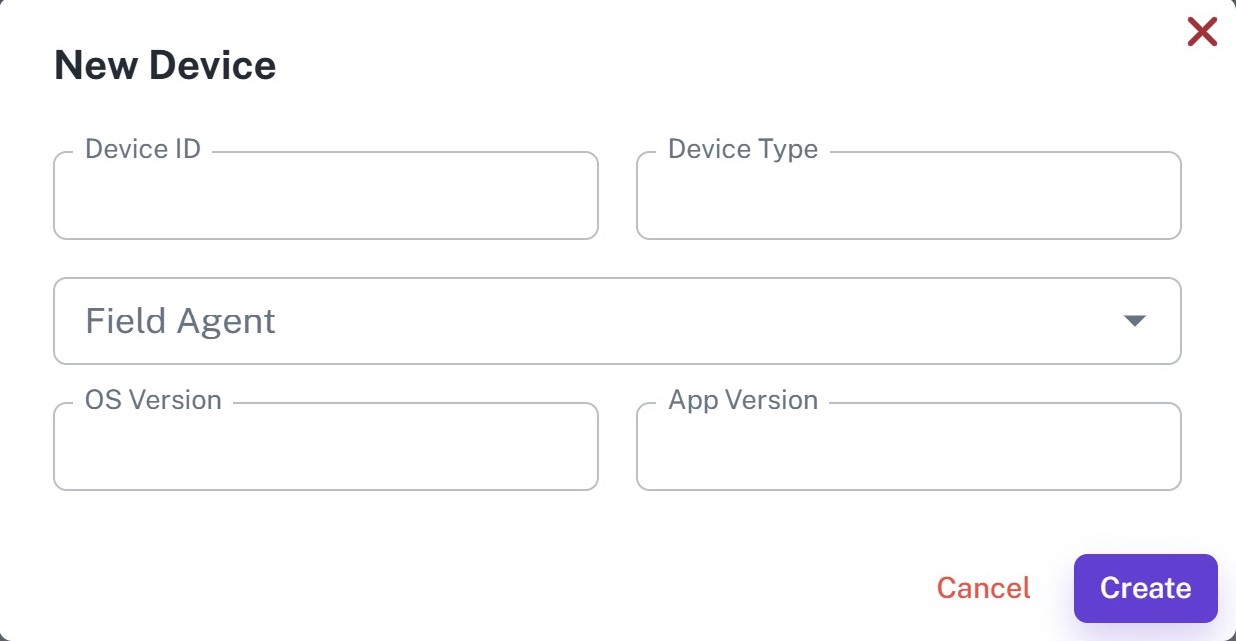
Register a mobile device used by a field agent for loan collection. Each registered device is linked to an agent, allowing administrators to monitor device usage and maintain secure field operations.
Key Highlights
- Register collection devices
- Assign field agents
- Store device information
- Track OS and app versions
- Manage trusted devices
- Monitor device status
How It Works
- Enter the Device ID.
- Enter the Device Type.
- Select the Field Agent.
- Enter the OS Version.
- Enter the App Version.
- Click Create to register the device.
Workflow
The administrator registers a mobile device by entering its details and assigning it to a field agent. Once registered, the device is available for secure loan collection activities and can be monitored from the Device Dashboard.
Devices List
Overview
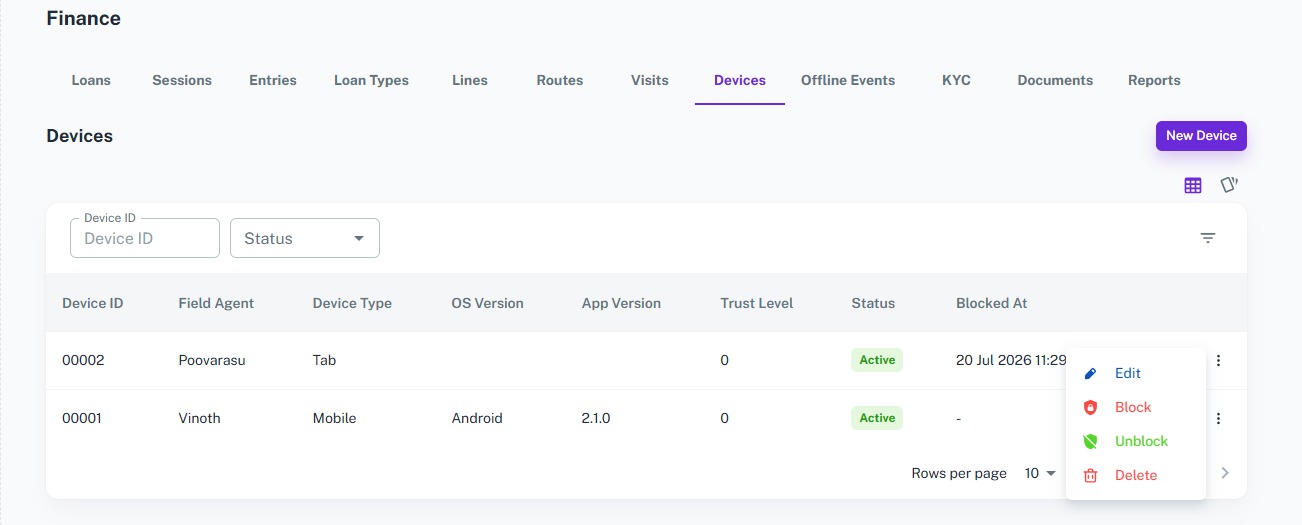
Monitor all registered collection devices from a centralized dashboard. Track assigned field agents, device information, app versions, trust levels, and device status to ensure secure field operations.
Key Highlights
- View all registered devices
- Search by Device ID
- Filter by device status
- Monitor assigned field agents
- Track OS and app versions
- View trust level
- Monitor blocked devices
How It Works
- Open the Device Dashboard.
- Search by Device ID or filter by status.
- View assigned field agents and device details.
- Monitor app versions and trust levels.
- Manage active and blocked devices.
Workflow
Administrators use the Device Dashboard to monitor all registered devices used for loan collection. The dashboard provides complete visibility into device assignments, software versions, trust levels, and device status, helping ensure that only authorized devices are used by field agents.