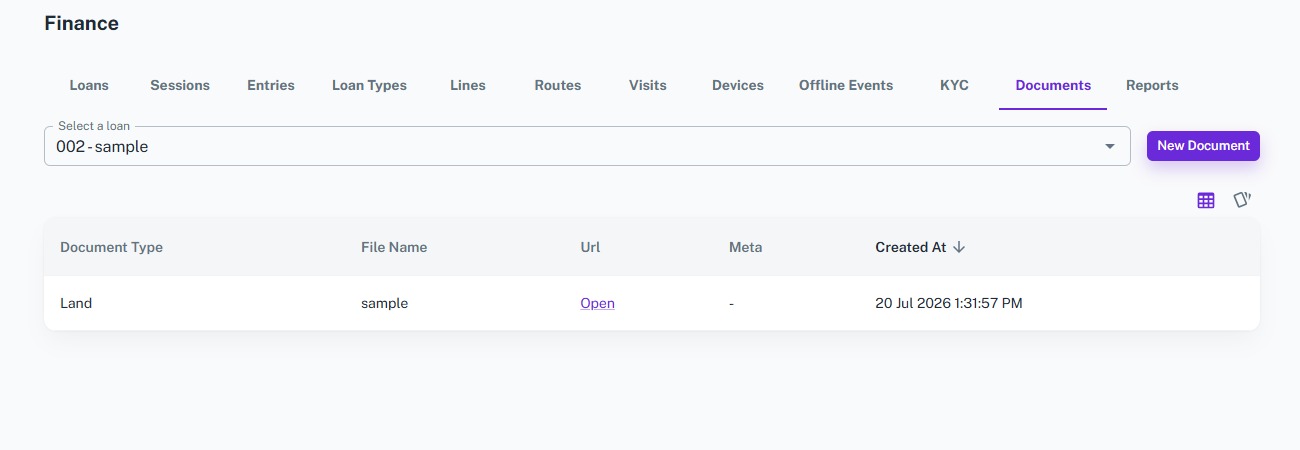
Documents
The Documents module helps financial institutions securely store and manage documents related to each loan. Select a loan, upload supporting documents, and maintain a centralized repository for easy access, verification, and future reference throughout the loan lifecycle.
Key Highlights of Documents
1. Loan-Based Document Storage
Upload and organize documents by selecting the corresponding loan.
2. Multiple Document Types
Store various loan-related documents such as agreements, identity proofs, collateral documents, property papers, invoices, and more.
3. Secure Document Repository
Maintain all loan documents in a centralized and secure location for easy retrieval.
4. Quick Document Access
Open and view uploaded documents directly from the document list whenever required.
5. Complete Document History
Keep a complete record of all uploaded documents along with file names, document types, metadata, and upload dates.
Upload Document
Overview
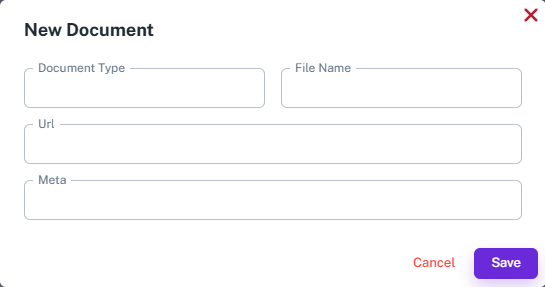
Upload supporting documents for a selected loan to maintain complete loan records. Every uploaded document is linked to the corresponding loan, making it easy to access and manage throughout the loan lifecycle.
Key Highlights
- Select a loan
- Upload loan documents
- Specify document type
- Store file information
- Add document metadata
- Maintain document history
How It Works
- Select the Loan.
- Enter the Document Type.
- Enter the File Name.
- Upload or provide the Document URL.
- Add metadata if required.
- Click Save to upload the document.
Workflow
The administrator selects a loan and uploads the required supporting documents by specifying the document type, file details, and metadata. Once uploaded, the document is securely linked to the selected loan and becomes available for future reference.
Documents List
Overview
View and manage all documents uploaded for a selected loan from a centralized dashboard. Easily access document details, open uploaded files, and maintain complete documentation for every loan.
Key Highlights
- View all loan documents
- Select a loan to view documents
- Open uploaded documents
- View document type and file name
- Access document metadata
How It Works
- Select a Loan.
- View all documents linked to the selected loan.
- Review document details.
- Open uploaded documents when required.
- Manage the document repository for future reference.
Workflow
Managers and administrators select a loan to view all associated documents. The document list provides quick access to uploaded files, document details, metadata, and upload history, ensuring every loan has complete and organized documentation.