Loan
The Loan Management module helps financial institutions, microfinance businesses, and lending organizations create, manage, and track loans from disbursement to final repayment. Create loans for customers, define repayment terms, automatically generate repayment schedules, and monitor collections from a single dashboard. Stay on top of every loan with real-time repayment status, pending dues, and complete loan history.
Key Highlights of Loan
1. Create Loans
Create loans by selecting a customer, choosing the loan type, entering the principal amount, interest rate, collection frequency, tenure, and start date. The system automatically calculates the total loan amount.
2. Flexible Loan Types
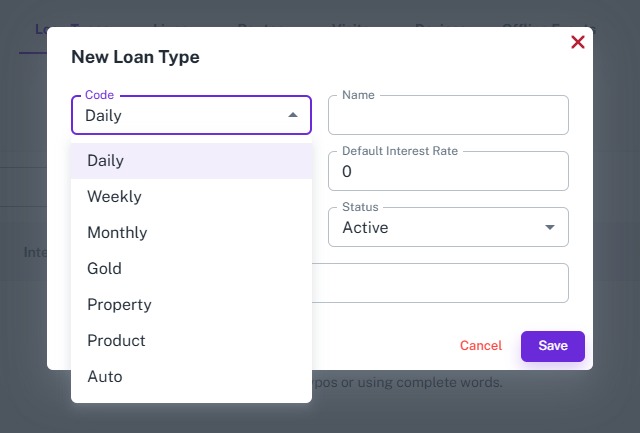
Create different types of loans based on your business requirements, including Daily, Weekly, Monthly, Gold, Property, Product, and Auto Loans. Each loan type supports its own specific details while following the same repayment and collection workflow.
3. Automatic Loan Schedule
Once a loan is created, the system automatically generates the complete repayment schedule based on the selected collection frequency and loan tenure. Every installment includes the due date, principal amount, interest amount, and total payable amount.
4. Loan Dashboard
Monitor all loans from a centralized dashboard. View active loans, total disbursed amount, total collections, outstanding dues, overdue schedules, and other important loan statistics at a glance.
5. Collection Tracking
Track every installment collected against each loan. Easily identify pending, partially paid, and completed installments while maintaining a complete payment history.
6. Real-Time Loan Status
Every loan and installment is updated automatically as collections are recorded. Managers can instantly monitor repayment progress and outstanding balances.
Create Loan
Overview
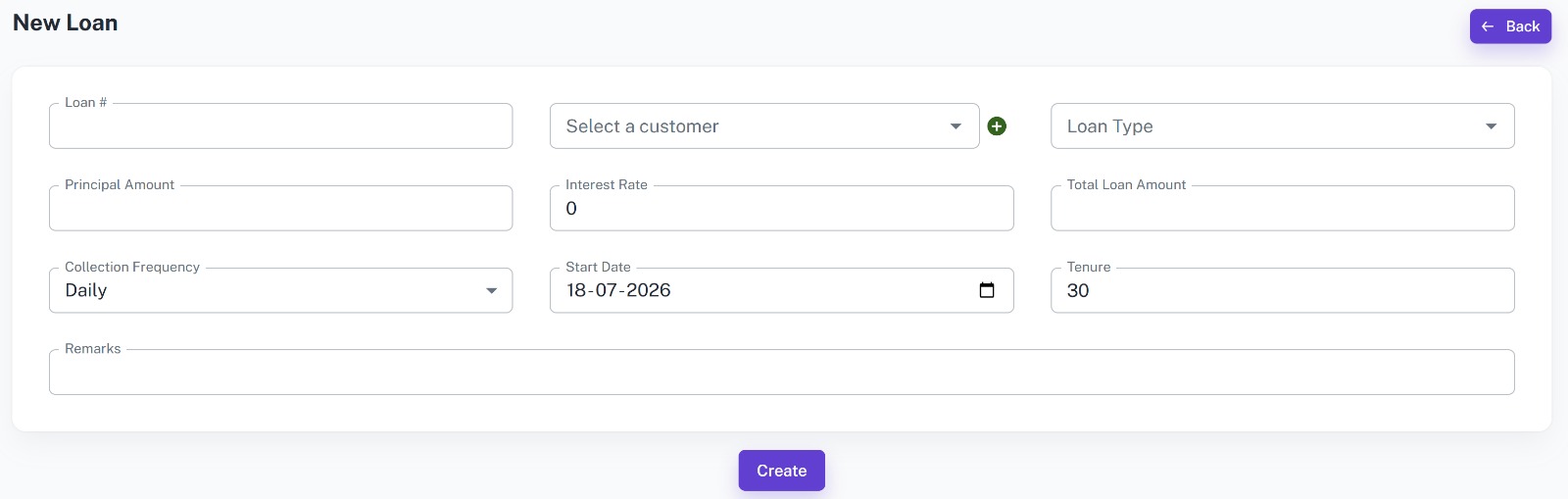
Create new loans by selecting a loan type, entering customer details, loan information, repayment terms, and collection frequency. Depending on the selected loan type, the system automatically captures additional information such as gold, property, product, or vehicle details before generating the repayment schedule.
Key Highlights
- Create loans for existing customers
- Select different loan types
- Define principal amount and interest rate
- Choose collection frequency (Daily, Weekly, Monthly, etc.)
- Set loan tenure and repayment start date
- Automatic total loan amount calculation
- Add remarks for internal reference
How It Works
- Enter the Loan Number.
- Select the customer receiving the loan.
- Choose the Loan Type.
- Enter the Principal Amount and Interest Rate.
- Select the Collection Frequency.
- Set the Start Date and Loan Tenure.
- Add remarks if required.
- Click Create to generate the loan.
Workflow
The manager creates a new loan by selecting the customer and the appropriate loan type. Depending on the selected loan type, the system captures additional information such as gold, property, product, or vehicle details. After entering the loan amount, interest rate, repayment frequency, tenure, and start date, the system automatically calculates the total payable amount and generates the complete repayment schedule.
Loan Types
Overview
Loan Types allow organizations to offer different lending products while maintaining a single loan management system. Each loan type contains its own information and validation, making it easy to manage secured, unsecured, and product-based loans from one platform.
Daily Loan
Ideal for businesses that collect repayments every day with short repayment cycles.
Weekly Loan
Designed for customers who repay installments every week.
Monthly Loan
Suitable for long-term loans with monthly repayment schedules.
Gold Loan
Manage loans secured against gold by recording item description, weight, purity, estimated value, current value, and redemption date.
Property Loan
Store property-related information including address, survey number, registration number, area, estimated value, and lien status.
Product Loan
Manage loans issued for products by recording product details, quantity, sale price, down payment, and installment count.
Auto Loan
Maintain complete vehicle information including registration number, VIN, vehicle make, model, year, valuation, insurance details, mileage, and lien status.
Key Highlights
- Support multiple loan types
- Configure default interest rates
- Store loan-specific information
- Support secured and unsecured loans
- Flexible repayment options
- Centralized loan management
- Easy loan categorization
How It Works
- Create or select a Loan Type.
- Configure the default interest rate.
- Create a new loan using the selected loan type.
- Enter loan-specific details based on the selected type.
- Save the loan.
- The system automatically generates the repayment schedule.
Workflow
The manager first selects the appropriate loan type based on the customer's borrowing requirement. Depending on the selected type, the system requests additional information such as gold details, property details, product information, or vehicle details. After the required information is entered, the loan is created and the repayment schedule is generated automatically.
Loan Dashboard
Overview
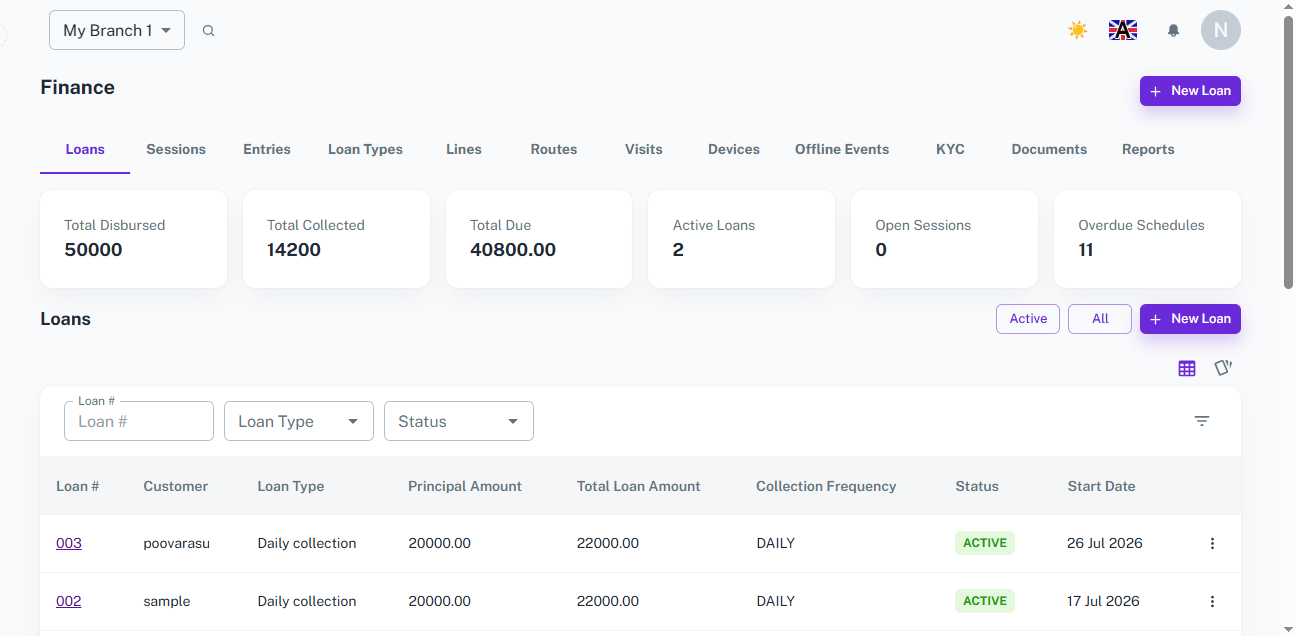
Monitor your entire loan portfolio from a centralized dashboard. View loan statistics, active loans, repayment progress, pending dues, and overdue installments in one place. Search, filter, and access individual loan details to stay on top of collections and outstanding balances.
Key Highlights
- View total disbursed amount, total collections, and outstanding dues
- Monitor active loans and overdue repayment schedules
- Track pending dues for all customer loans in one dashboard
- Search and filter loans by Loan Number, Loan Type, or Status
- View upcoming and overdue installments with due dates and payable amounts
- Open individual loan details to view repayment schedules and collection history
- Access real-time loan and repayment status
How It Works
- Open the Loan Dashboard to view overall loan statistics.
- Review summary cards showing total disbursed amount, collections, active loans, total due, and overdue schedules.
- Browse the loan list or search using Loan Number, Loan Type, or Status.
- Scroll to the Pending Dues section to view unpaid and overdue installments across all customer loans.
- Open any loan to view its repayment schedule, payment history, and outstanding balance.
Workflow
The manager opens the Loan Dashboard to monitor all lending activities from a single screen. The dashboard provides a complete overview of loan performance, collections, outstanding balances, active loans, and overdue schedules. The integrated Pending Dues section displays all upcoming and unpaid installments, helping managers prioritize collections and track repayment progress efficiently. Selecting a loan opens its detailed repayment schedule and collection history for complete loan management.
Loan Schedule
Overview
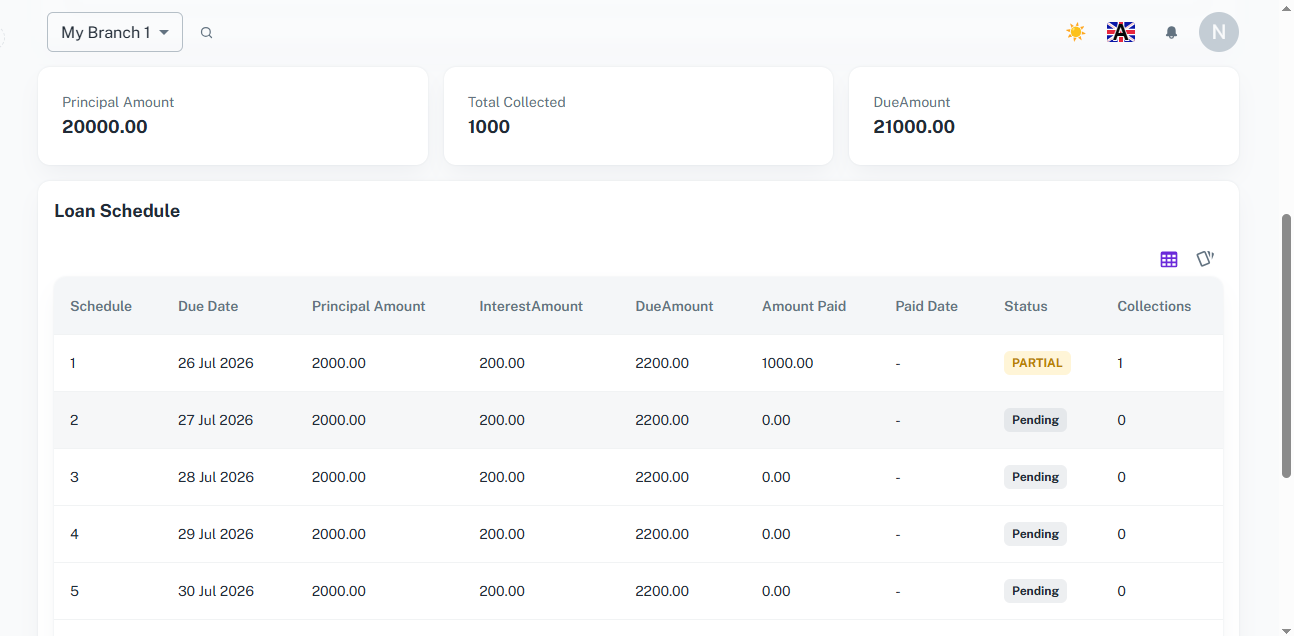
Each loan automatically receives a repayment schedule based on the selected collection frequency and tenure. Every installment includes due dates, repayment amounts, payment status, and collection history.
Key Highlights
- Automatic installment generation
- Due date for every repayment
- Principal and interest breakdown
- Total payable amount per installment
- Track amount paid
- View payment date
- Monitor Pending, Partial, and Paid statuses
- Collection count for every installment
How It Works
- The repayment schedule is generated automatically after the loan is created.
- Each installment contains the due date, principal amount, interest amount, and total due amount.
- As repayments are collected, installment records are updated automatically.
- Managers can monitor pending, partial, and completed installments directly from the schedule.
Workflow
After creating a loan, the system generates the complete repayment schedule based on the loan terms. As collections are recorded, each installment is updated with the payment amount, payment date, and repayment status. Managers can easily monitor repayment progress, identify overdue installments, and track the overall loan balance.
How It Works
1. Create the Loan
The manager creates a loan by selecting the customer, entering the principal amount, interest rate, repayment frequency, tenure, and start date.
2. Repayment Schedule is Generated
Once the loan is created, the system automatically generates the complete repayment schedule with installment dates and payable amounts.
3. Track Collections
As customers make repayments, installment records are updated automatically, showing paid amounts, payment dates, and repayment status.
4. Monitor Loan Performance
Managers monitor loan progress from the dashboard, track pending dues, review repayment schedules, and manage outstanding balances from a single place.
Workflow
The manager creates a loan by entering customer and loan details such as principal amount, interest rate, repayment frequency, tenure, and start date. After the loan is created, the system automatically generates the repayment schedule with installment-wise due dates and payable amounts. As repayments are collected, the schedule updates in real time, reflecting payment amounts and statuses. Managers can monitor all loans, pending dues, collections, and repayment progress through the centralized loan dashboard, ensuring every loan is tracked accurately from disbursement to final settlement.



















