Loyalty Points
The Customer Loyalty Points module helps businesses reward customers for their purchases and encourage repeat sales. Customers automatically earn loyalty points when they make eligible purchases, and accumulated points can be redeemed during future sales. Businesses can configure earning and redemption rules and set special loyalty points for individual products.
Key Highlights of Customer Loyalty Points
1. Enable or Disable Loyalty Points
Turn the loyalty program on or off based on your business requirements.
2. Automatic Point Earning
When a customer is selected during a sale, eligible loyalty points are automatically calculated and added to the customer's account.
3. Product-Specific Loyalty Rules
Set different point-earning rules for selected products using the Add Rule For A Product option.
4. Redeem Loyalty Points
Customers with available loyalty points can redeem them during a sale by selecting the Redeem Points option.
5. Flexible Earning & Redemption Rules
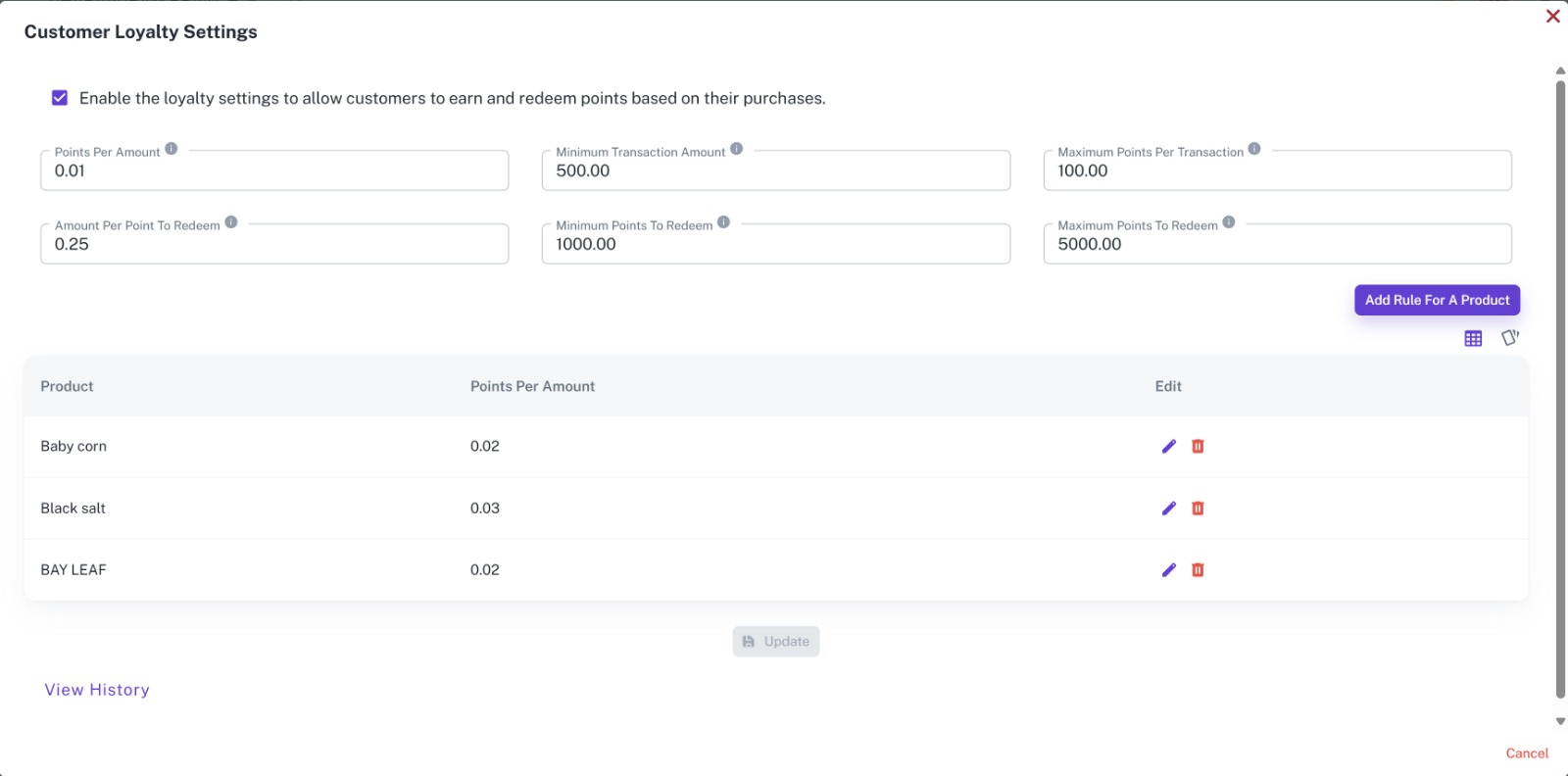
Configure minimum transaction amounts, maximum points per transaction, point redemption value, and minimum or maximum redemption limits.
6. Loyalty History
View customer loyalty point history to track points earned and redeemed over time.
Loyalty Settings
Overview
Configure how customers earn and redeem loyalty points across your business. Define general earning rules, redemption values, transaction limits, and product-specific rules from a centralized settings screen.
Key Highlights
- Enable or disable loyalty points
- Set points earned based on purchase amount
- Define minimum transaction amount
- Set maximum points earned per transaction
- Define the value of points during redemption
- Set minimum and maximum redemption limits
- Configure product-specific point rules
- View loyalty point history
How It Works
- Enable Customer Loyalty Points.
- Configure the points earned based on purchase amount.
- Set the minimum eligible transaction amount.
- Define maximum points per transaction.
- Configure the value of points when redeemed.
- Set minimum and maximum redemption limits.
- Add product-specific loyalty rules if required.
- Save the loyalty settings.
Product-Specific Rules
Businesses can define special earning rules for individual products. By clicking Add Rule For A Product, select a product and configure its points-per-amount value. When customers purchase that product, the configured product rule is used to calculate their loyalty points.
Earn Loyalty Points
Overview
Customers automatically earn loyalty points when they make eligible purchases. When the customer is selected on the Sales screen, the system calculates the applicable points based on the configured loyalty settings and purchased products.
Workflow
The customer is selected during the sale and completes an eligible purchase. The system automatically calculates the earned loyalty points and adds them to the customer's available point balance.
Redeem Loyalty Points
Overview
Customers can use their accumulated loyalty points to reduce the payable amount on future purchases. If the customer has available points, the user can choose to redeem them directly from the Sales screen.
How It Works
- Select the Customer on the Sales screen.
- The system checks the customer's available loyalty points.
- Select the Redeem Points checkbox if the customer wants to use their points.
- The system calculates the applicable redemption value based on the configured rules.
- Complete the sale with the loyalty benefit applied.
Overall Workflow
The business enables loyalty points and configures the earning and redemption rules. When a customer is selected during a sale, the system automatically calculates and adds eligible points based on the purchase and product-specific rules. Customers can accumulate these points over multiple purchases and redeem their available points during future sales. The system automatically maintains the customer's loyalty balance and complete points history.



















