Manual Attendance
The Manual Attendance module gives managers full control over staff attendance. When an employee arrives, the admin or manager clicks Swipe In — and when they leave, clicks Swipe Out. In time and out time are recorded instantly, with no device needed and no paperwork involved.
Key Highlights of Manual Attendance
1. Swipe In
When an employee arrives at work, the admin or manager clicks the Swipe In button against that employee's name. The system records the exact in time immediately.
2. Swipe Out
When the employee leaves, the admin or manager clicks Swipe Out. The system records the out time and the attendance entry for the day is complete.
3. Accurate In & Out Time Logging
Every swipe is stored against the employee's record with the exact date, in time, and out time — giving you a clean, reliable attendance log without any manual paperwork.
4. Attendance History
View the complete attendance record for any employee — daily in and out times, working hours, and attendance patterns — all accessible from the dashboard.
New Attendance
Overview
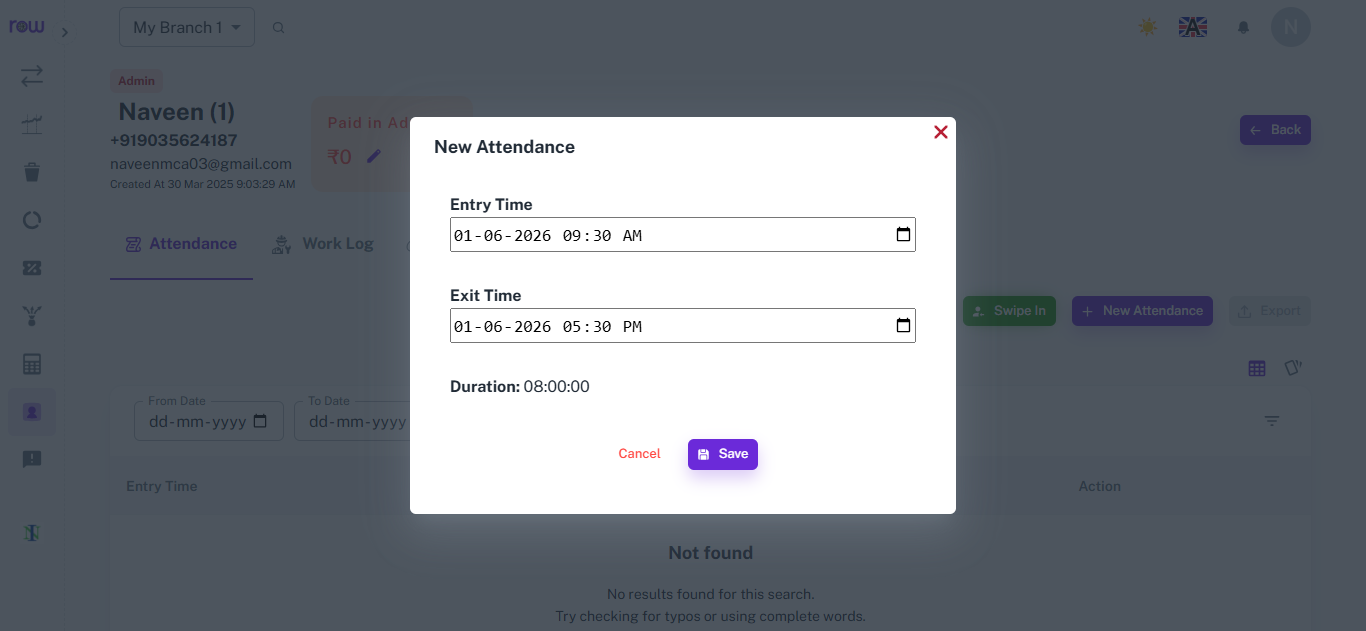
The New Attendance form lets admins or managers manually add an employee's entry and exit time when biometric check-in isn't available or was missed.
Key Highlights
- Entry Time Field
- Exit Time Field
- Auto Duration Calculation
How It Works
- Click New Attendance from the employee's Attendance tab.
- Select the entry date and time.
- Select the exit date and time.
- The duration is automatically calculated and displayed.
- Click Save to record the attendance, or Cancel to discard.
Workflow
When an employee's attendance isn't captured automatically, the admin opens New Attendance, enters the entry and exit time, checks the auto-calculated duration, and saves the record.
Attendance List
Overview
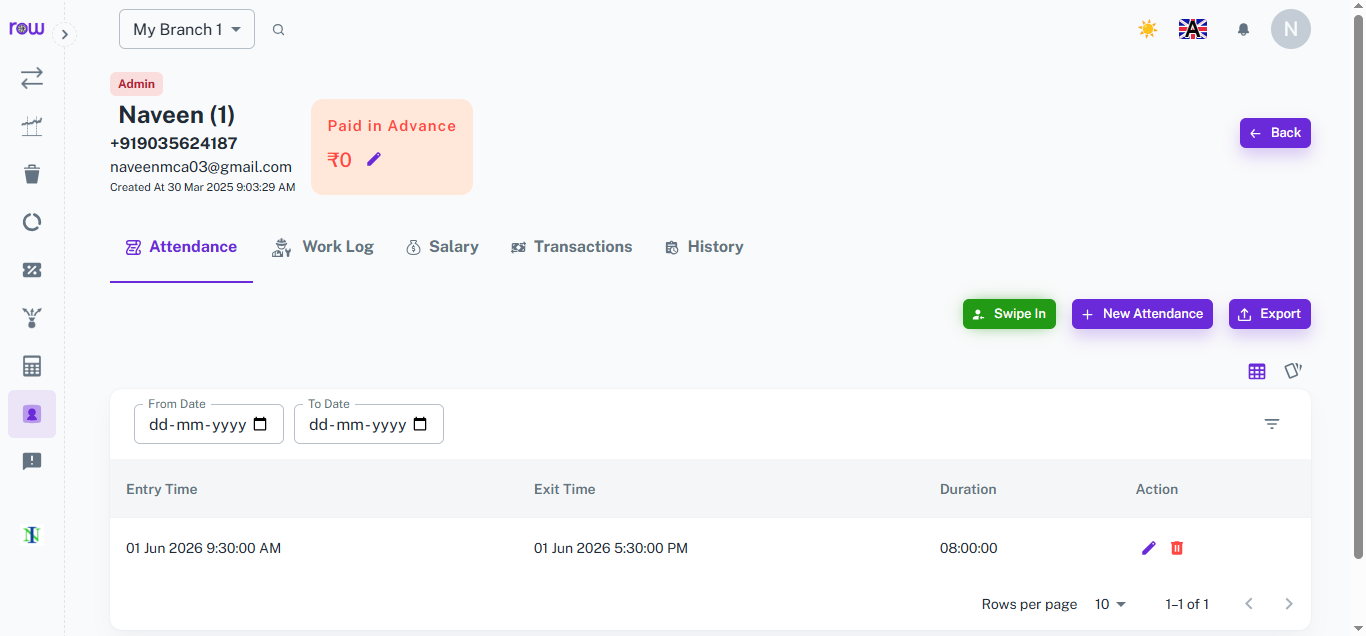
The Attendance List shows every recorded entry and exit time for an employee, giving a clear day-wise view of their working hours.
Key Highlights
- Entry & Exit Time Log
- Duration Display
- Edit & Delete Actions
- Date Filter & Export
How It Works
- View each attendance record with entry time, exit time, and total duration.
- Filter records by selecting a From Date and To Date.
- Edit any entry using the edit icon or remove it using the delete icon.
- Export the attendance list for reporting or record-keeping.
Workflow
After attendance is recorded — whether through biometric or manual entry — it appears in the Attendance List with entry time, exit time, and duration. Managers can filter by date, make corrections if needed, and export the data whenever required.
How It Works
1. Employee arrives at work
The admin or manager opens the attendance panel and clicks Swipe In against the employee's name. The system records the in time instantly.
2. Employee leaves work
At the end of the shift, the admin or manager clicks Swipe Out for that employee. The system records the out time and closes the attendance entry for the day.
3. Attendance is stored automatically
Every swipe action is saved to the employee's record with the exact date and time — no manual entries, no spreadsheets, no paper registers.
4. Managers review attendance
Managers can view attendance records for any employee or any date range — in time, out time, and total hours worked — directly from the dashboard.
Workflow
When an employee arrives at work, the admin or manager clicks Swipe In against their name — the system records the in time instantly. At the end of the shift, the manager clicks Swipe Out — the out time is recorded and the attendance entry for the day is closed. All records are stored automatically with exact timestamps. Managers can review the full attendance log at any time, and the data feeds directly into payroll to ensure salary calculations are based on accurate, verified working hours.



















