Offers
The Offers module helps businesses create and manage special offers for their products. Create different types of offers with specific validity dates, apply them to selected products or all products, and automatically provide the applicable offer during sales.
Key Highlights
Create Offers
Create offers by entering the offer name, offer type, validity period, and required offer details.
Multiple Offer Types
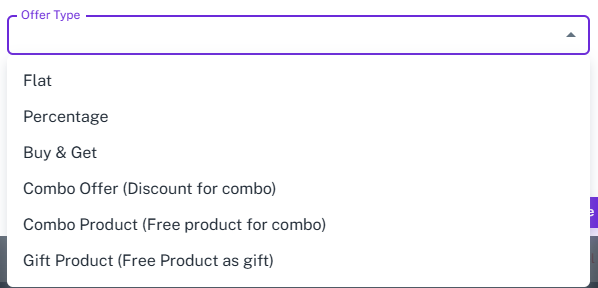
Choose from Flat Discount, Percentage Discount, Buy & Get, Combo Discount, Combo Product, and Gift Product offers.
Product-Based Offers
Apply offers to specific products or make them available for all products.
Set Offer Period
Define the start and end dates to control when the offer is active.
Active / Inactive Offers
Enable or disable offers based on business requirements.
Offer Management
View all created offers with their offer type, validity period, and current status.
Offer Types
Flat Offer
Provide a fixed discount when the offer conditions are met.
Example: Flat ₹200 off on a purchase above ₹2,000.
Percentage Offer
Provide a percentage-based discount on eligible purchases.
Example: 20% off on purchases above ₹5,000, with an optional
maximum discount amount.
Buy & Get
Give free products based on the quantity purchased.
Example: Buy 2 products and get 2 free.
Combo Offer
Provide a discount when customers purchase a selected
combination of products.
Example: Buy a selected product combo and get ₹500 off.
Combo Product
Give a free product when customers purchase a specified product
combination.
Example: Buy the selected combo and get a free product.
Gift Product
Provide a selected product as a free gift when the offer condition is met.
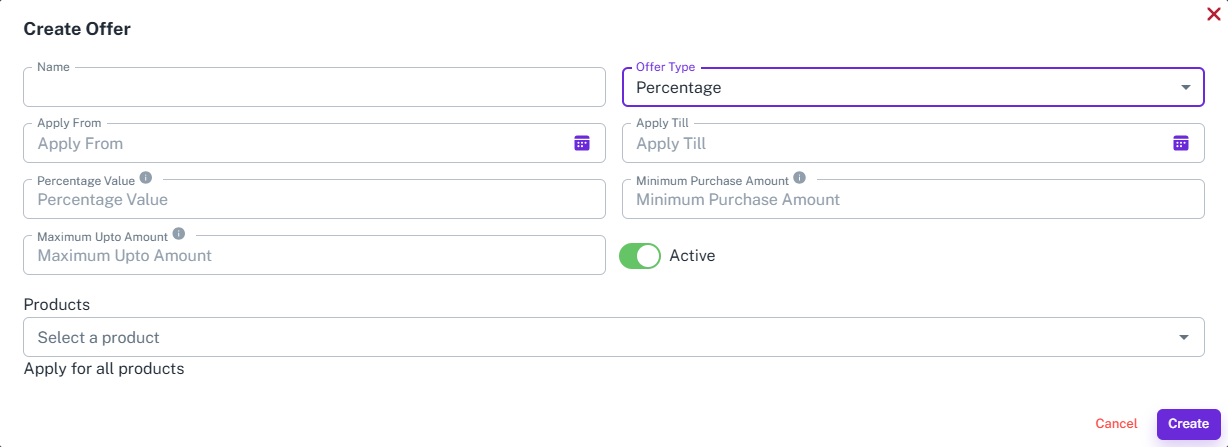
Create Offer
Overview
Create offers by selecting the offer type, setting the validity period, defining the offer conditions, and choosing the applicable products.
How It Works
- Enter the Offer Name.
- Select the Offer Type.
- Set the Apply From and Apply Till dates.
- Enter the required offer details based on the selected offer type.
- Select the products or choose Apply for all products.
- Enable the offer as Active.
- Click Create to save the offer.
Workflow
The user creates an offer by selecting the offer type, defining the offer conditions and validity period, and selecting the applicable products. Once created and activated, the offer becomes available during sales whenever the required conditions are met. All created offers can be viewed and managed from the Offers list.