Production Costing
Know the true cost of everything you make with Run On Web. Track raw material costs, control waste, and set selling prices that protect your profit.
Production Costing Made Simple
Knowing what each product really costs to make is essential for any food or manufacturing business to control expenses and stay profitable. With our website, you gain access to a robust production costing solution designed to show your cost, your profit, and the right selling price for every product.
Production Unit Setup
Overview
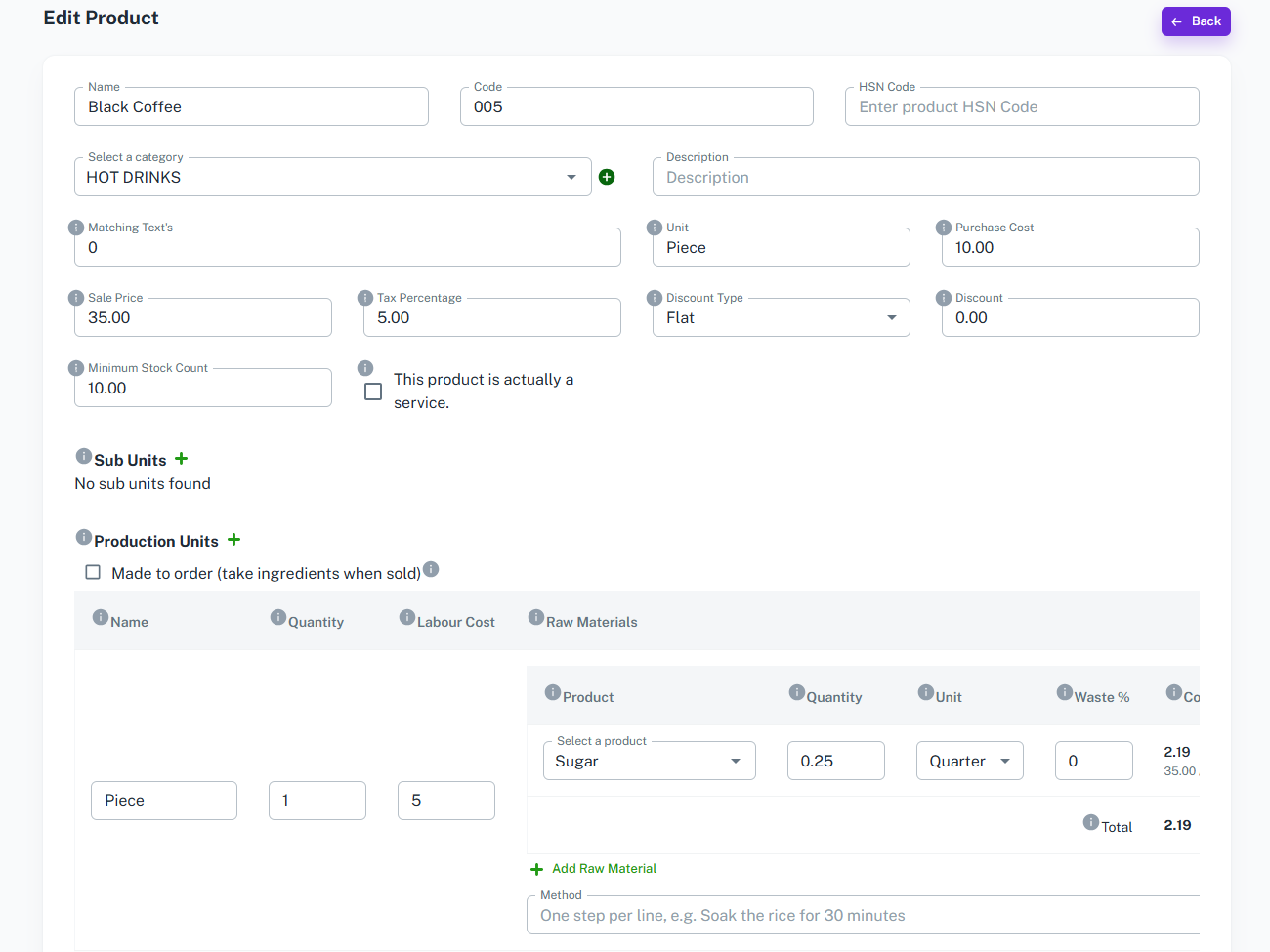
The Production Unit section in the product page allows users to define how a product is made. It features a form to capture raw materials, labour cost, and method, and shows the costing instantly.
Key Features
-
Production Unit Screen
- Go to the menu and open the Products screen. Select a product, then click the + icon next to Production Units in the product form to add a new production unit.
-
Production Unit Form
- Name (Piece, Box, etc.)
- Quantity (How many pieces the recipe makes.)
- Labour Cost
-
Raw Materials (Select the products used to make
this item)
- Product
- Quantity
- Unit
- Waste % (The waste added during preparation is included in the cost.)
- Cost
- Method (Write one step per line.)
- Made to order (If you check this box, the raw materials are taken from stock when the product is sold.)
- Dropdowns and auto-suggestions for raw materials.
Production Costing Summary
Overview
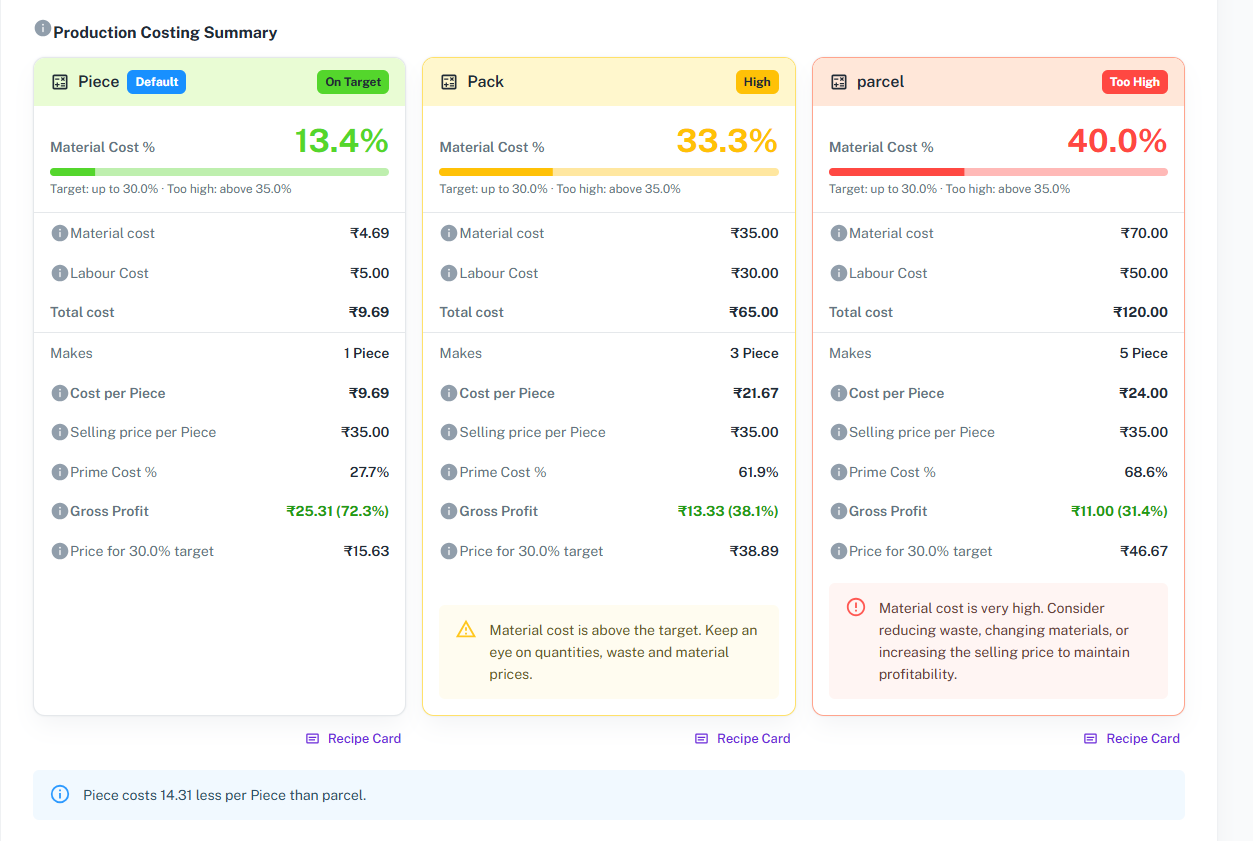
The Production Costing Summary shows the full cost of each production unit as soon as you add raw materials and labour. It helps you see your cost, your profit, and the price you need to charge, right inside the product page.
Key Features
-
Production Costing Summary Card
-
Shows one summary card for each production unit, with material cost, waste included, labour cost, and total cost.
-
Displays how many pieces the recipe makes, the cost per piece, and the selling price per piece.
-
Shows the prime cost %, the gross profit, and the price for your target material cost.
-
-
Automated Calculations
-
Automatically computes the material cost, waste included, labour cost, and total cost.
-
Displays cost per piece, selling price per piece, prime cost %, and gross profit.
-
Shows the price you need to charge to reach your target material cost.
-
-
Cost Status Indicator
-
Marks the material cost % as On Target or Too High with a clear progress bar.
-
Suggests reducing waste, changing materials, or increasing the selling price when the cost is too high.
-
-
Multiple Production Units
-
Add more than one production unit to a product, such as Piece and Box, and set one as the default.
-
Compare the cost of each unit side by side to see which one costs less per piece.
-
-
Recipe Card
-
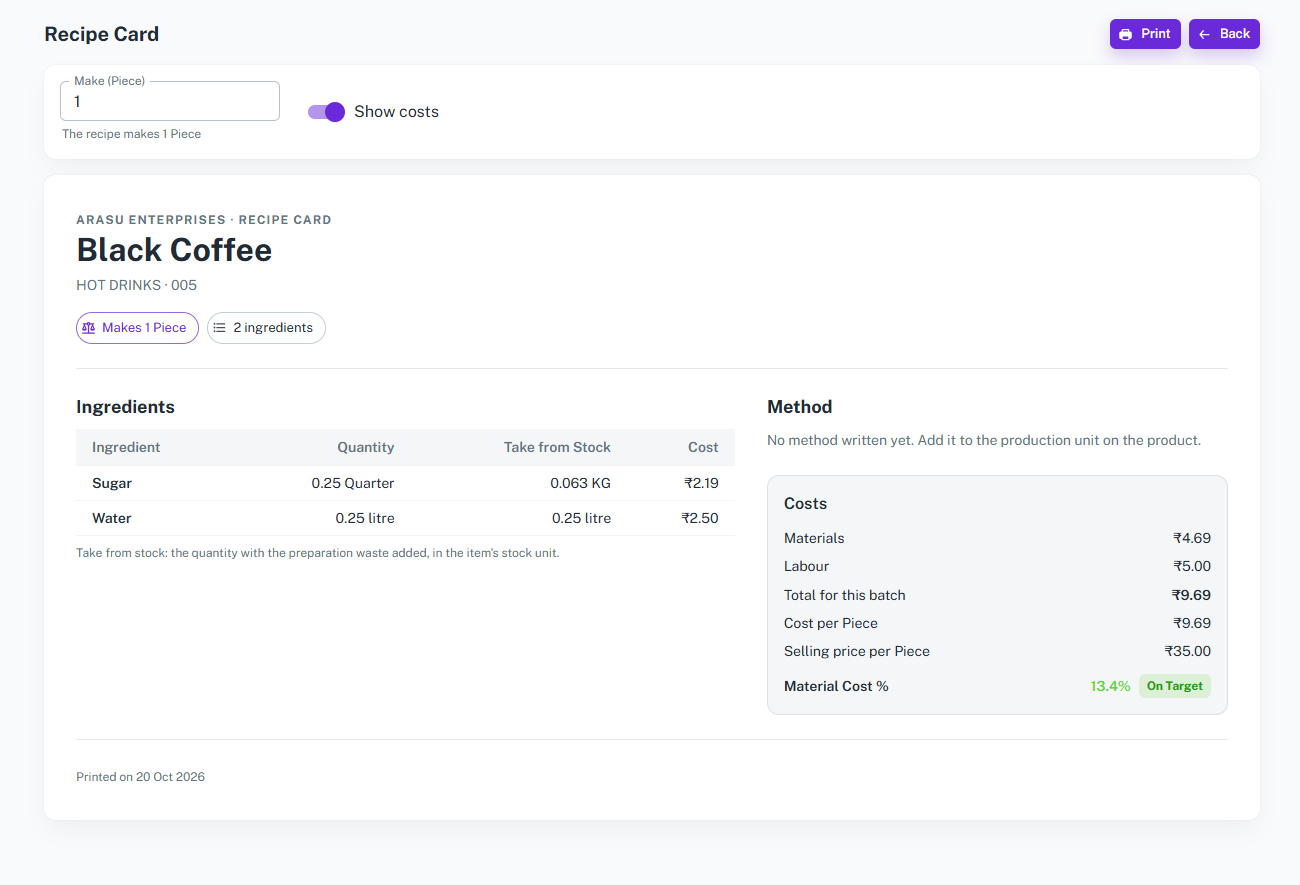
Open a recipe card for any production unit with its ingredients, quantity to take from stock, method, and costs.
-
Enter how many pieces you want to make, and all quantities and costs are scaled automatically.
-
Turn costs on or off, and print the card for your kitchen or production team.
-
Key Features
1. Recipe-Based Cost Calculation
Add raw materials, quantity, waste percentage, and labour cost to each product, and the cost per piece is calculated automatically.
2. Profit and Target Price Insights
See material cost percentage, gross profit, and the suggested selling price needed to reach your target, so you never sell below profit.
3. Price Change Alerts
Get alerts when purchase prices rise or drop, and see which products are affected before your margins suffer.
Production Costing Dashboard

Overview
The Production Costing Dashboard serves as a centralized hub to view the cost of every product made at your location against its selling price. This page provides a tabular view of all production units and price alerts, enabling easy tracking of cost, profit, and status.
Key Features
-
Production Units List
-
Displays summary cards showing Products Made, Average Material Cost %, and how many products are On Target or Too High.
-
Columns include: Product, Production Unit, Cost per Unit, Selling Price, Material Cost %, Gross Profit, Suggested Price, and Status.
-
Shows the cost range when a product has more than one production unit.
-
-
Search and Filter Options
-
Search products by name.
-
Apply filters to view products based on status and category.
-
-
Price Alerts
-
Shows the number of price rises, price drops, products affected, and products that are now too high.
-
Compares each recipe cost at the previous and latest price, along with the suggested price to adjust.
-
View changes for the last 7, 30, or 90 days, and filter by the size of the change.
-
-
Purchase Price Changes
-
Lists each purchased item with its previous price, latest price, the change, and the number of recipes it is used in.
-
Production Cost Report
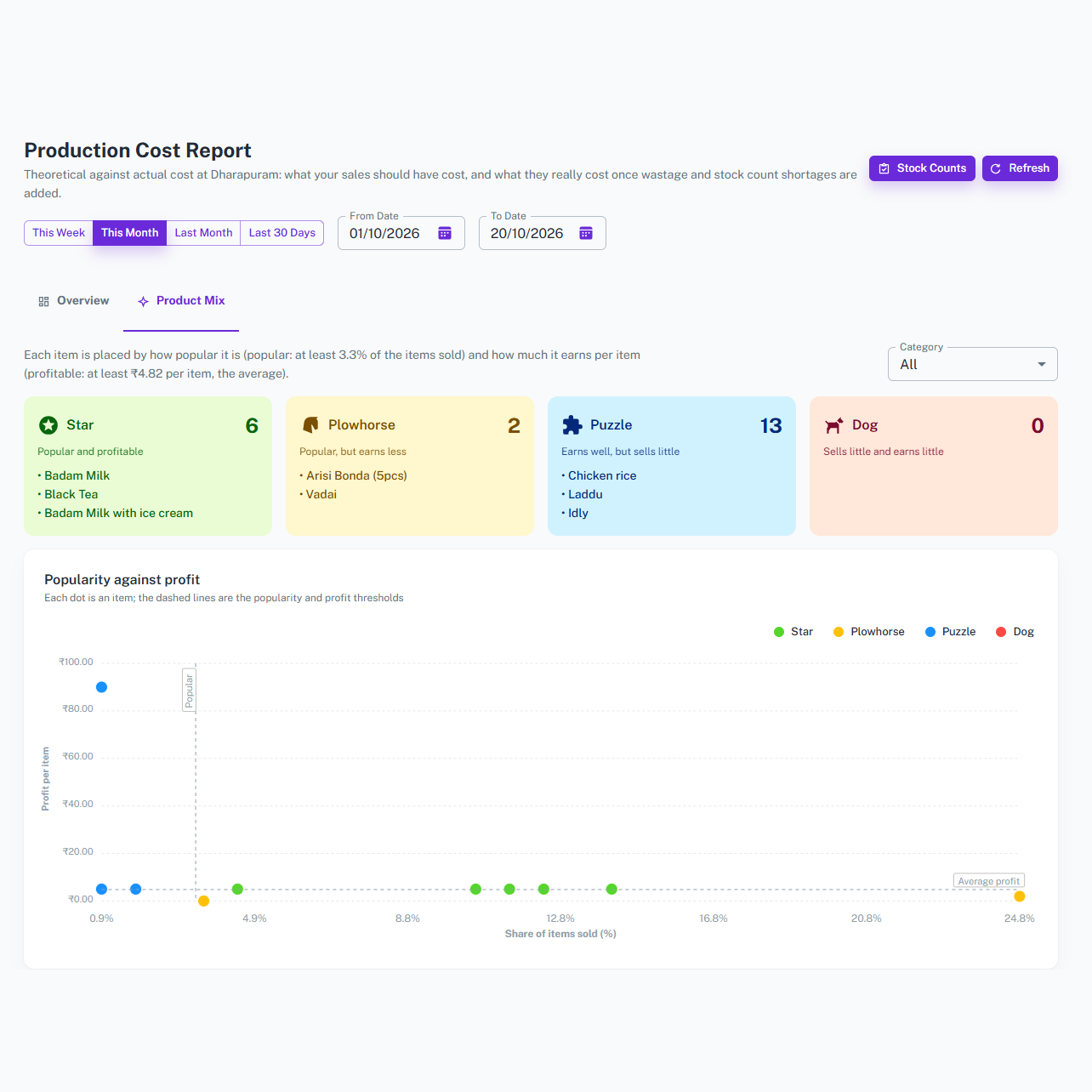
Overview
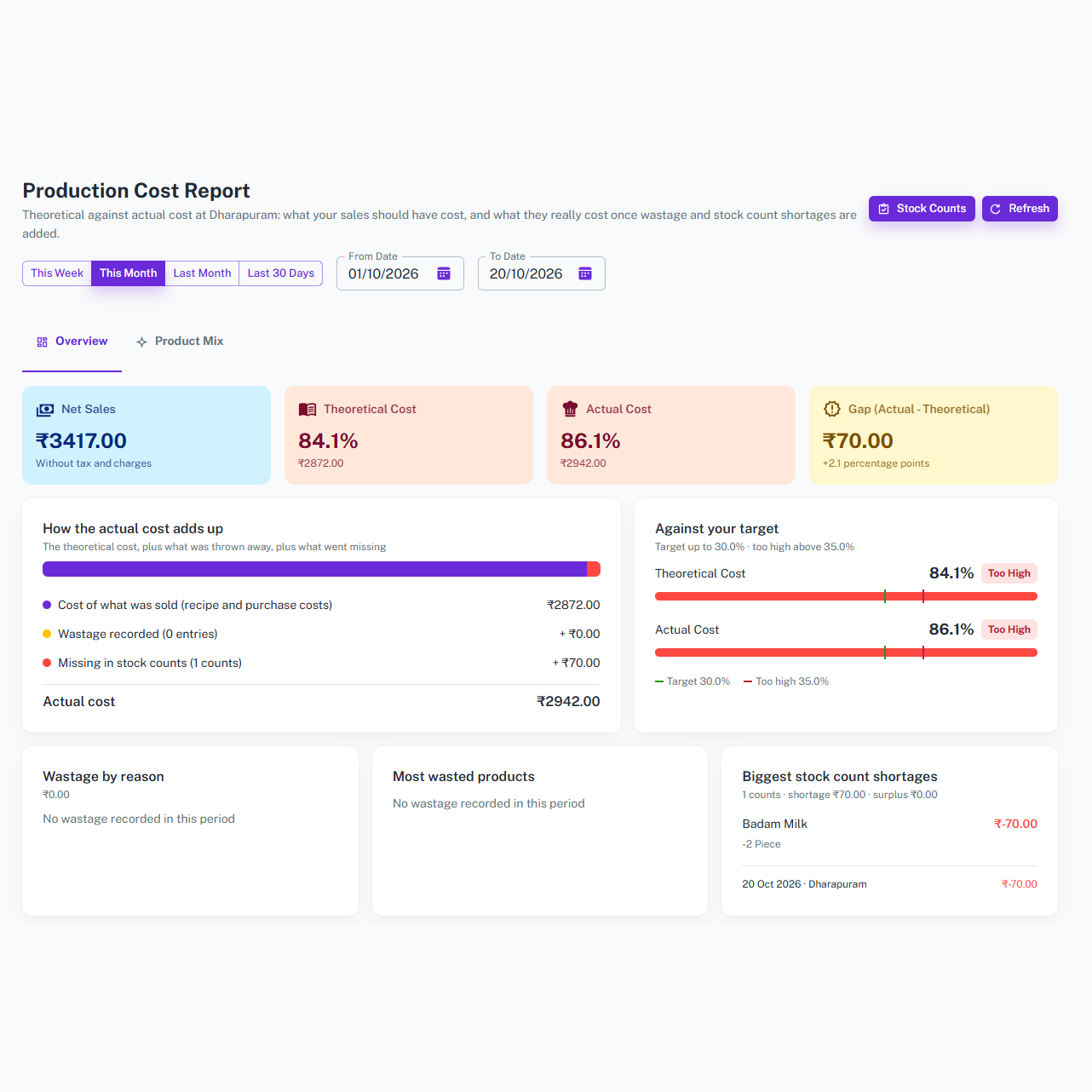
The Production Cost Report compares what your sales should have cost against what they really cost once wastage and stock count shortages are added. It helps you find where your money is being lost.
Key Features
-
Cost Overview
-
Displays Net Sales, Theoretical Cost, Actual Cost, and the gap between them.
-
Compares theoretical and actual cost against your target with a clear On Target or Too High status.
-
-
How the Actual Cost Adds Up
-
Breaks the actual cost into the cost of what was sold, wastage recorded, and what went missing in stock counts.
-
Shows wastage by reason, the most wasted products, and the biggest stock count shortages.
-
Start a new stock count directly from the report to see what really went missing.
-
-
Items Sold
-
Lists each product with quantity sold, sales, cost, cost %, and status.
-
Search by product and view results for this week, this month, last month, last 30 days, or a custom date range.
-
-
Product Mix
-
Groups your items as Star, Plowhorse, Puzzle, or Dog based on how popular they are and how much they earn per item.
-
Shows a popularity against profit chart and gives a simple action for each item, so you know what to promote, reprice, or review.
-
Overall Features of the Production Costing Module
-
Comprehensive Cost Management
-
Record raw materials, waste, labour, and production units for all your products in one place.
-
Centralized repository for all costing data, accessible anytime.
-
-
Automated Calculations
-
Automatically calculate total cost, gross profit, and suggested selling price.
-
Reduces manual errors and ensures accuracy.
-
-
Real-Time Insights
-
Monitor price changes and cost status of every product.
-
Compare theoretical and actual cost to find waste and protect your profit.
-
Why Choose Us?
Our production costing system is user-friendly, scalable, and
designed to meet the unique needs of businesses of all sizes.
Whether you’re running a small kitchen or a large production unit,
our solution helps you stay in control of your costs and
profits.
Start costing your products smarter and faster today. Explore
the features and tools on our website and take the first step
toward higher profits.



















