Routes
The Route Management module helps assign daily collection work to field agents. Managers can create routes, assign collection lines, start field collections, monitor progress, and complete routes with the total amount collected for accurate reconciliation.
Key Highlights of Route Management
1. Create Daily Routes
Create collection routes by assigning a collection line, field agent, and collection date.
2. Assign Field Agents
Allocate collection responsibilities to individual field agents for organized field operations.
3. Start Collection Routes
Field agents start their assigned routes before visiting customers and collecting loan repayments.
4. Complete Routes
Once all customer visits are completed, field agents close the route by entering the total amount collected during the trip.
5. Track Route Status
Monitor Planned, Active, and Completed routes along with assigned agents, visits, and collection amounts.
Create Route
Overview
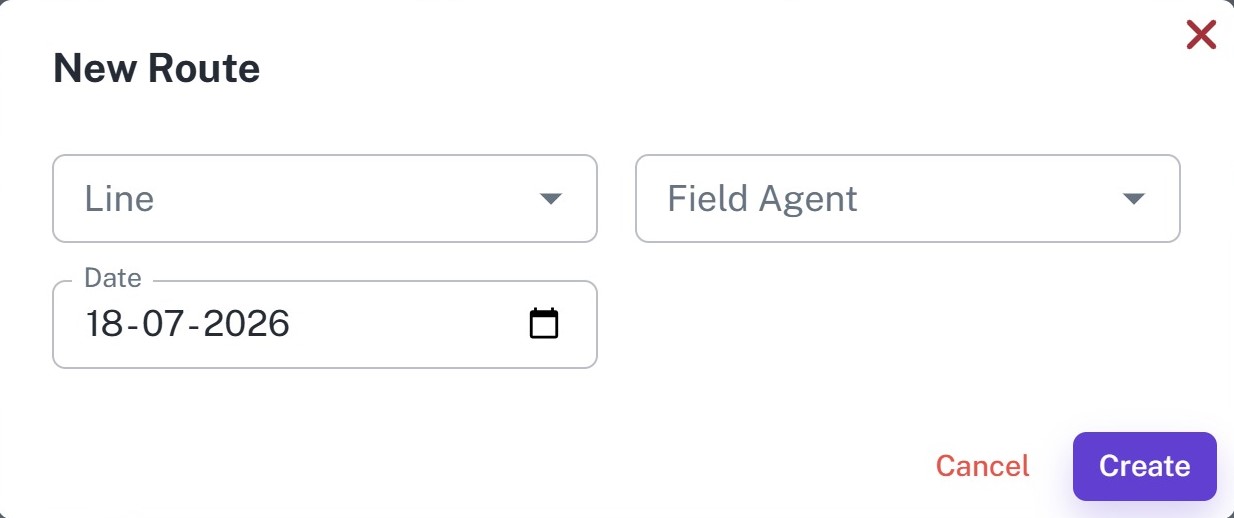
Create daily collection routes by assigning a collection line to a field agent. Routes help organize daily loan collection activities and improve collection efficiency.
Key Highlights
- Create daily routes
- Assign collection lines
- Assign field agents
- Select collection date
- Plan daily collections
How It Works
- Select the Collection Line.
- Select the Field Agent.
- Choose the Route Date.
- Click Create.
Workflow
The manager creates a route by assigning a collection line, field agent, and collection date. The route is then ready for the assigned field agent to begin collections.
Routes List
Overview
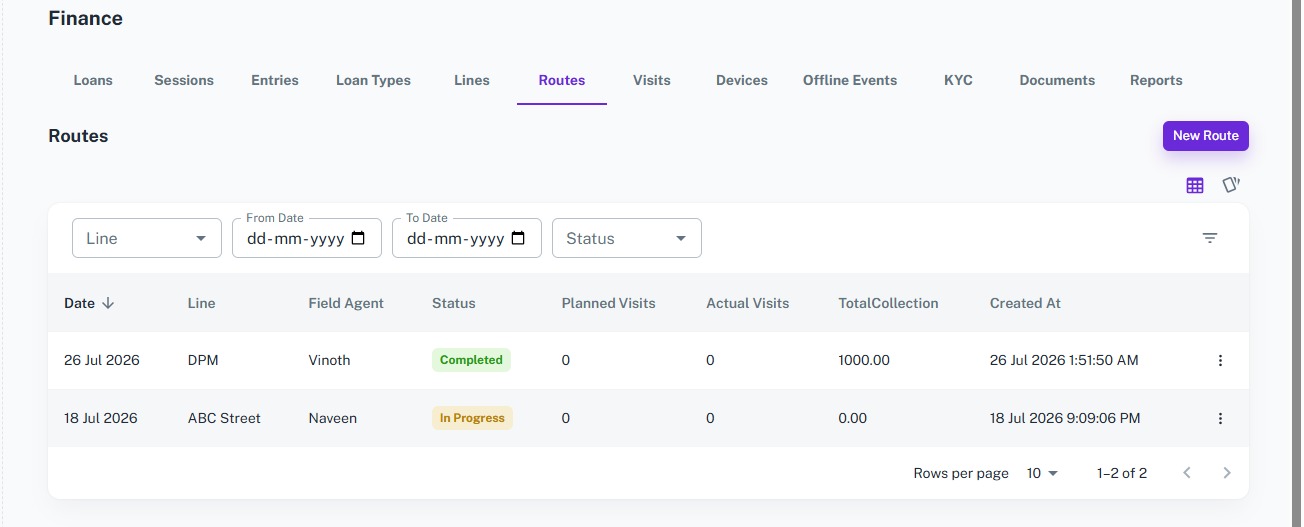
Monitor all collection routes from a centralized dashboard. Track route status, assigned field agents, planned visits, actual visits, and total collections in real time.
Key Highlights
- View all routes
- Search and filter routes
- Track Planned, Active, and Completed routes
- Monitor assigned field agents
- View total collections
- Manage route progress
How It Works
- Open the Route Dashboard.
- Search or filter routes.
- Start the assigned route.
- Monitor collection progress.
- Complete the route after collections are finished.
Workflow
Managers monitor all collection routes from a single dashboard. They can track route progress, monitor field agents, review collection amounts, and ensure daily collection activities are completed successfully.
Complete Route
Overview
After completing all customer visits, the field agent closes the route by entering the total amount collected during the trip. This creates a collection summary and completes the day's field activity.
Key Highlights
- Complete collection routes
- Enter total collected amount
- Automatic route status update
- Maintain collection summary
- Support cash reconciliation
- Preserve complete route history
How It Works
- Open the active route.
- Click Complete.
- Enter the Total Collected Amount.
- Save the route.
- The system marks the route as Completed and stores the collection summary.
Workflow
Once all scheduled collections are finished, the field agent completes the route by entering the total amount collected. The system updates the route status to Completed, records the collection summary, and makes it available for reporting, reconciliation, and performance tracking.