Salary Based On Attendance
The Salary Management module calculates employee pay automatically based on their attendance records. Whether your staff are on a fixed monthly salary, a daily rate, or an hourly rate — the system handles it all. With built-in buffer time, late deductions, and overtime tracking, every salary is calculated fairly and accurately without a single manual calculation.
Key Highlights of Salary Management
1. Flexible Salary Types
Set each employee's salary type based on your business needs — fixed monthly salary, daily rate, or hourly rate. Different employees can have different salary structures under the same system.
2. Attendance-Based Calculation
Salary is calculated directly from attendance records. The system reads each employee's in time and out time and computes the pay based on actual days or hours worked — no manual input needed.
3. Buffer Time
A 15-minute buffer is built in before the shift start time. If an employee arrives within the buffer window, they are considered on time — no deduction applied. This avoids unnecessary penalties for minor delays.
4. Late Deduction
If an employee arrives after the 15-minute buffer period, they are marked late. The system applies the appropriate deduction automatically based on their salary type and the time lost.
5. Overtime Tracking
If an employee works beyond their shift end time, the extra hours are automatically counted as overtime. Overtime pay is calculated and added to their salary based on the rate configured.
6. Role-Based Access
Only the admin and managers with the right permission — granted by the admin — can process or view salary details. Sensitive payroll data stays in the right hands.
Calculate Salary
Overview
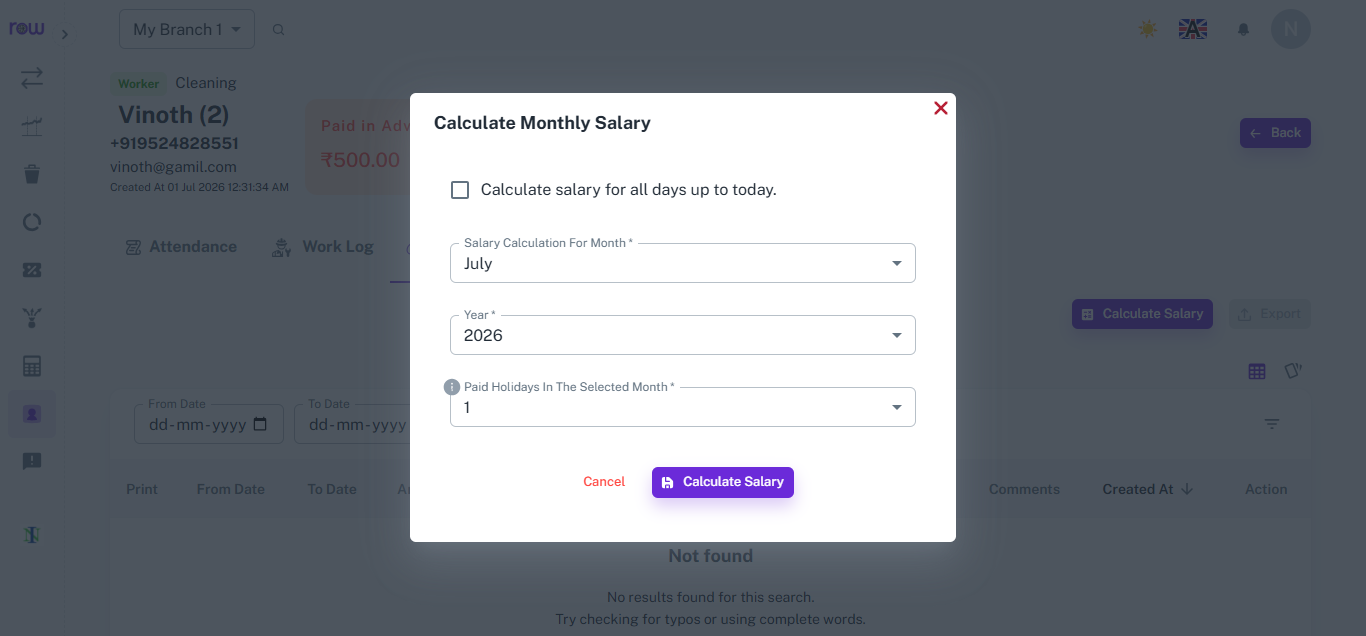
The Calculate Monthly Salary popup lets managers generate an employee's salary for a specific month, or calculate it for all days up to the current date, in just a few clicks.
Key Highlights
- Month & Year Selection
- Calculate for All Days Option
- Paid Holidays Adjustment
How It Works
- Click Calculate Salary from the employee's profile.
- Check "Calculate salary for all days up to today" if calculating outside a fixed month.
- Otherwise, select the specific Salary Calculation Month and Year.
- Enter the number of paid holidays for the selected month.
- Click Calculate Salary to proceed to the detailed salary breakdown.
Workflow
At the end of the month, or whenever salary needs to be checked, the manager opens Calculate Salary, selects the month and year, enters paid holidays, and proceeds to view the detailed salary calculation based on attendance and work done.
Review And Approve The Salary
Overview
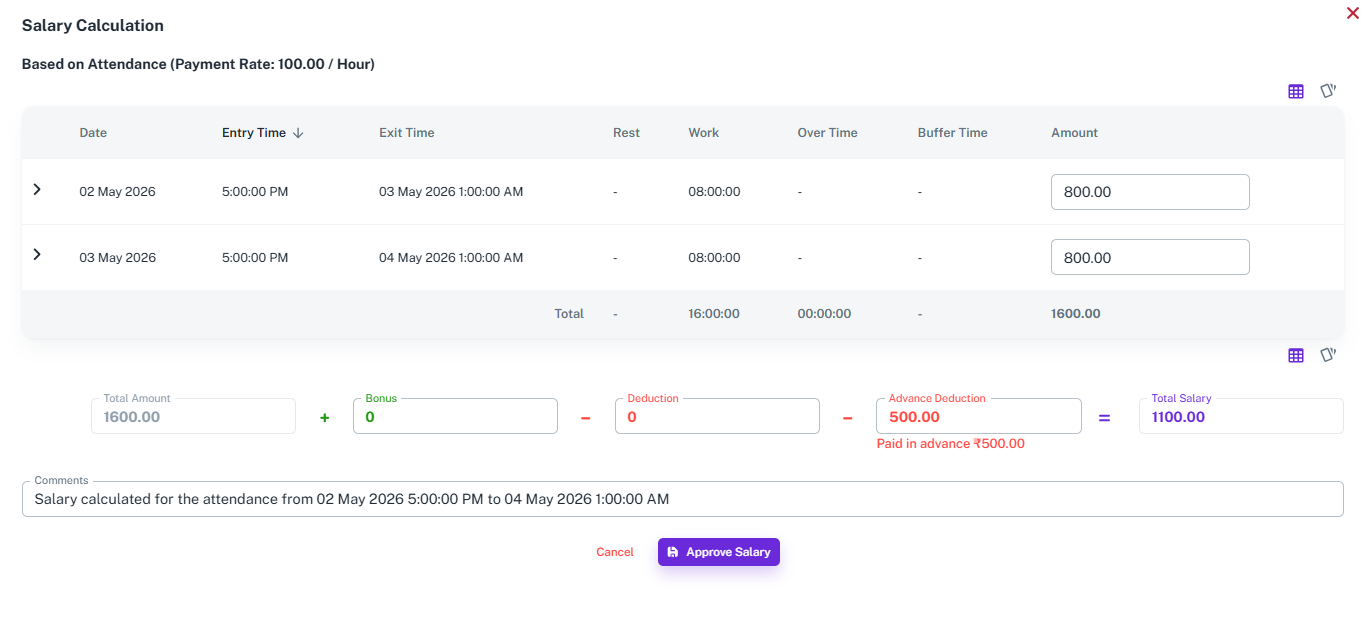
The Salary Calculation screen breaks down an employee's pay based on their attendance records, with the flexibility to add bonuses and deduct advances before approving the final salary.
Key Highlights
- Attendance-Wise Breakdown
- Work, Overtime & Buffer Time
- Bonus & Deduction Fields
- Advance Adjustment
How It Works
- View each attendance entry with date, entry time, exit time, work hours, overtime, and buffer time.
- The amount for each entry is calculated based on the payment rate.
- The system totals the work hours and amount across all entries.
- Add any bonus or deduction to adjust the total amount.
- Any advance paid to the employee is automatically deducted from the total.
- Add comments if needed, then click Approve Salary to finalize.
Workflow
After selecting the salary period, the system pulls all attendance records and calculates the total work hours and amount. The manager reviews the breakdown, adjusts bonus or deductions if needed, and the system automatically subtracts any advance already paid. Once verified, the manager clicks Approve Salary to finalize the payment.
How It Works
1. Set up employee salary type
The admin configures each employee's salary structure — monthly, daily, or hourly — along with their shift timing and overtime rate.
2. Attendance is recorded
Throughout the month, attendance is captured via biometric or manual swipe — in time and out time logged for every working day.
3. Buffer time is applied
When calculating salary, the system checks if the employee arrived within the 15-minute buffer. Arrivals within the window are treated as on time. Arrivals beyond it are marked late.
4. Late deductions are calculated
For late arrivals past the buffer, the system calculates the deduction automatically based on the employee's salary type and the duration of the delay.
5. Overtime is calculated
If the employee's out time goes beyond the shift end, the extra hours are counted as overtime and added to the salary calculation automatically.
6. Salary is processed
The admin or authorized manager reviews the calculated salary for each employee and processes payment. Every figure is backed by attendance data — transparent and dispute-free.
Workflow
The admin sets up each employee's salary type — monthly, daily, or hourly — along with their shift start and end time. Throughout the month, attendance is recorded automatically via biometric or manual swipe. At salary processing time, the system reads every in and out time, applies the 15-minute buffer to determine punctuality, deducts for late arrivals beyond the buffer, and adds overtime for hours worked beyond the shift. The final salary figure is calculated for each employee and reviewed by the admin or an authorized manager before processing. Every number is tied directly to attendance — accurate, fair, and fully auditable.



















