Salary Based on Work Done
The Work-Based Salary module calculates employee pay directly from their work log. Each item carries its own rate — the more they produce, the more they earn. Advance deductions are handled automatically, and only authorized staff can process or review payroll. Fair, transparent, and fully backed by real work data.
Key Highlights of Salary Based on Work Done
1. Work Log Driven Salary
Salary is calculated based on what each employee actually produced during the pay period. The system reads directly from the work log — no manual tallying, no estimation.
2. Item-Based Rate
Every item carries its own pay rate. For example, Biryani may have a different rate than Chapati or Dessert. Each employee is paid based on the exact items they produced and the rate assigned to each one.
3. Automatic Salary Calculation
Once the work log entries are in place, the system calculates the total salary automatically — multiplying the quantity of each item by its rate and summing up the total for the pay period.
4. Advance Deduction
If an employee has taken an advance, the amount is deducted automatically during salary calculation. The final payout reflects the actual amount due after the advance is subtracted.
5. Role-Based Access
Only the admin and managers with permission granted by the admin can process or view salary details. Payroll data stays secure and accessible only to the right people.
Calculate Salary
Overview
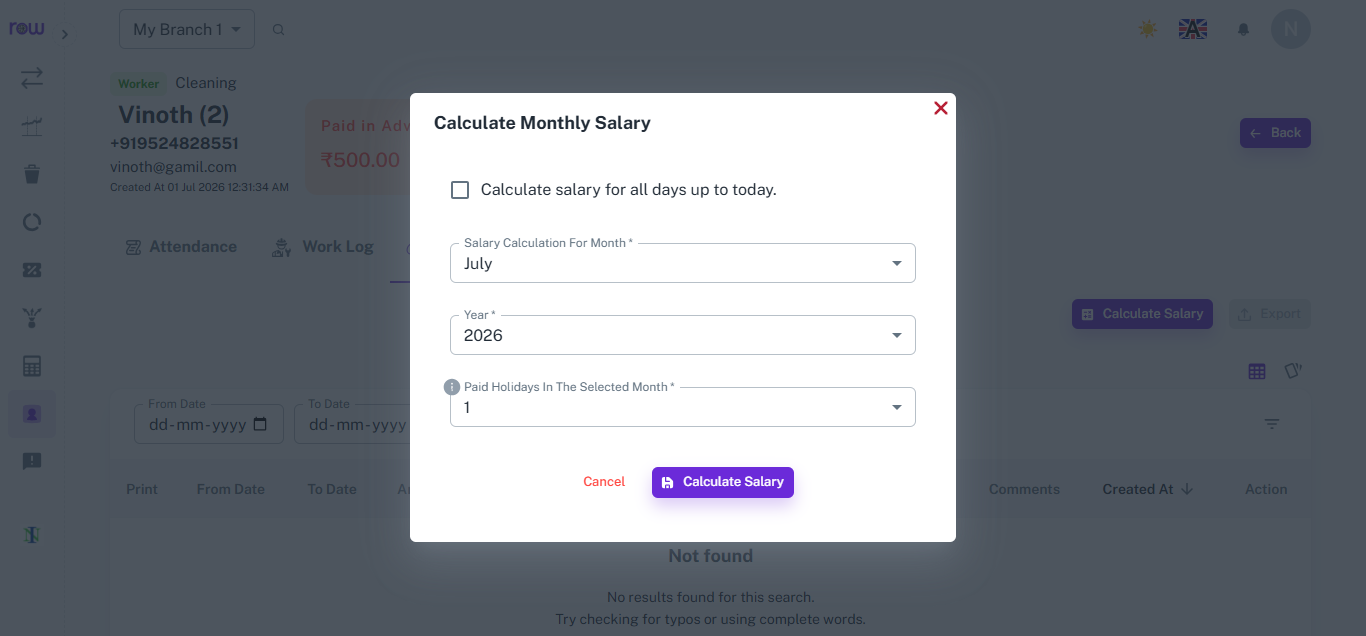
The Calculate Monthly Salary popup lets managers generate an employee's salary for a specific month, or calculate it for all days up to the current date, in just a few clicks.
Key Highlights
- Month & Year Selection
- Calculate for All Days Option
- Paid Holidays Adjustment
How It Works
- Click Calculate Salary from the employee's profile.
- Check "Calculate salary for all days up to today" if calculating outside a fixed month.
- Otherwise, select the specific Salary Calculation Month and Year.
- Enter the number of paid holidays for the selected month.
- Click Calculate Salary to proceed to the detailed salary breakdown.
Workflow
At the end of the month, or whenever salary needs to be checked, the manager opens Calculate Salary, selects the month and year, enters paid holidays, and proceeds to view the detailed salary calculation based on attendance and work done.
Review And Approve The Salary
Overview
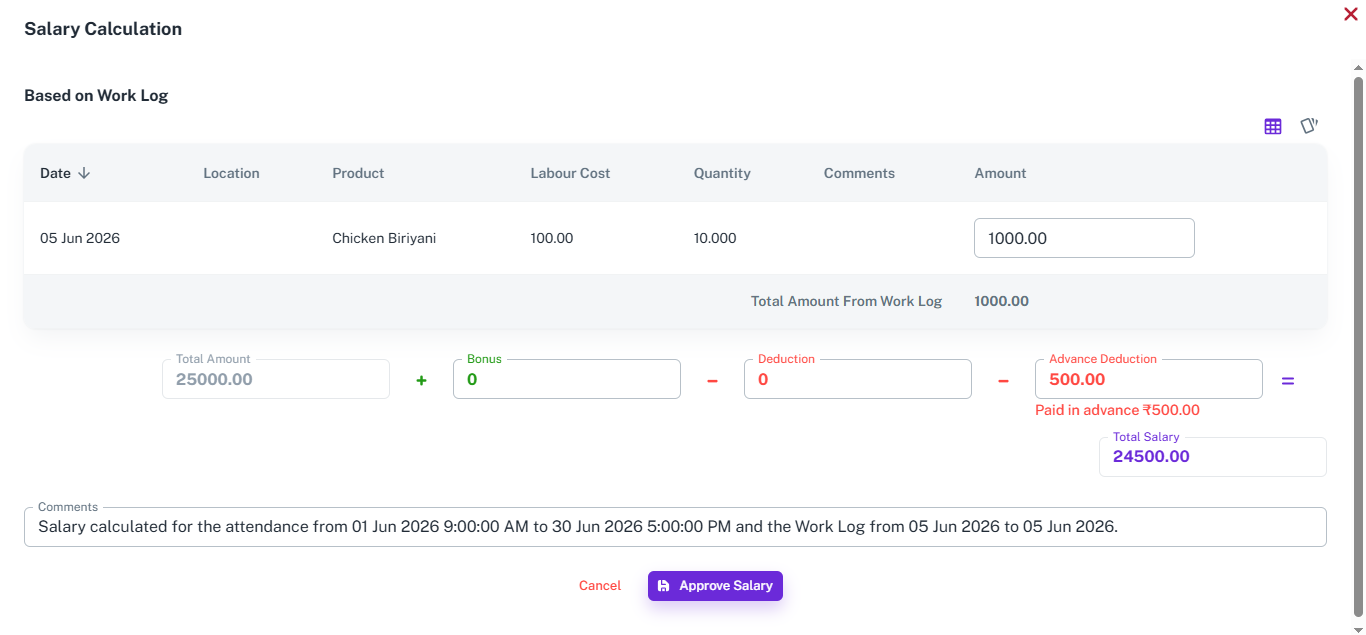
The Salary Calculation screen calculates an employee's pay based on the work they've completed, using logged work entries to determine the total amount owed.
Key Highlights
- Work Log-Wise Breakdown
- Total Amount from Work Log
- Bonus & Deduction Fields
- Advance Adjustment
How It Works
- View each work log entry with date, location, product, labour cost, quantity, and amount.
- The system totals the amount from all work log entries for the selected period.
- Add any bonus or deduction to adjust the total amount.
- Any advance already paid to the employee is automatically deducted from the total.
- Add comments if needed, then click Approve Salary to finalize.
Workflow
When it's time to process salary, the system pulls all work log entries for the employee and calculates the total amount based on quantity and labour cost. The manager reviews the breakdown, adjusts bonus or deductions if needed, and the system automatically subtracts any advance already paid. Once verified, the manager clicks Approve Salary to finalize the payment.
How It Works
1. Set item rates
The admin configures a pay rate for each item — every product in the work log has its own rate assigned based on the effort and skill required to produce it.
2. Manager logs the work
Throughout the pay period, the manager records each employee's work — item produced, quantity, date, time, and section. These entries build the basis for salary calculation.
3. System calculates the salary
At the end of the pay period, the system reads all work log entries for each employee, multiplies each item's quantity by its rate, and totals the amount automatically.
4. Advance is deducted
If the employee has an outstanding advance, the system deducts it from the calculated salary — showing both the gross amount and the final payable amount clearly.
5. Salary is reviewed and processed
The admin or authorized manager reviews the calculated salary, verifies the work log entries behind it, and processes the payment. Every figure is fully traceable.
Workflow
The admin sets up a pay rate for each item in the system. Throughout the pay period, the manager logs each employee's work — recording the item produced, quantity, date, time, and kitchen section. At the end of the period, the system reads all work log entries for each employee, multiplies every item's quantity by its assigned rate, and calculates the total automatically. If the employee has taken an advance, it is deducted from the total before the final payable amount is shown. The admin or an authorized manager reviews the breakdown and processes the salary — every figure backed by a clear, itemized work log.



















