Visits
The Visits module helps field agents record customer visits during loan collection activities. When a customer cannot make a repayment during the visit, the visit is still recorded to maintain a complete field activity history. Managers can monitor scheduled visits, customer interactions, GPS location, visit duration, and visit status from a centralized dashboard.
Key Highlights of Visit Management
1. Schedule Customer Visits
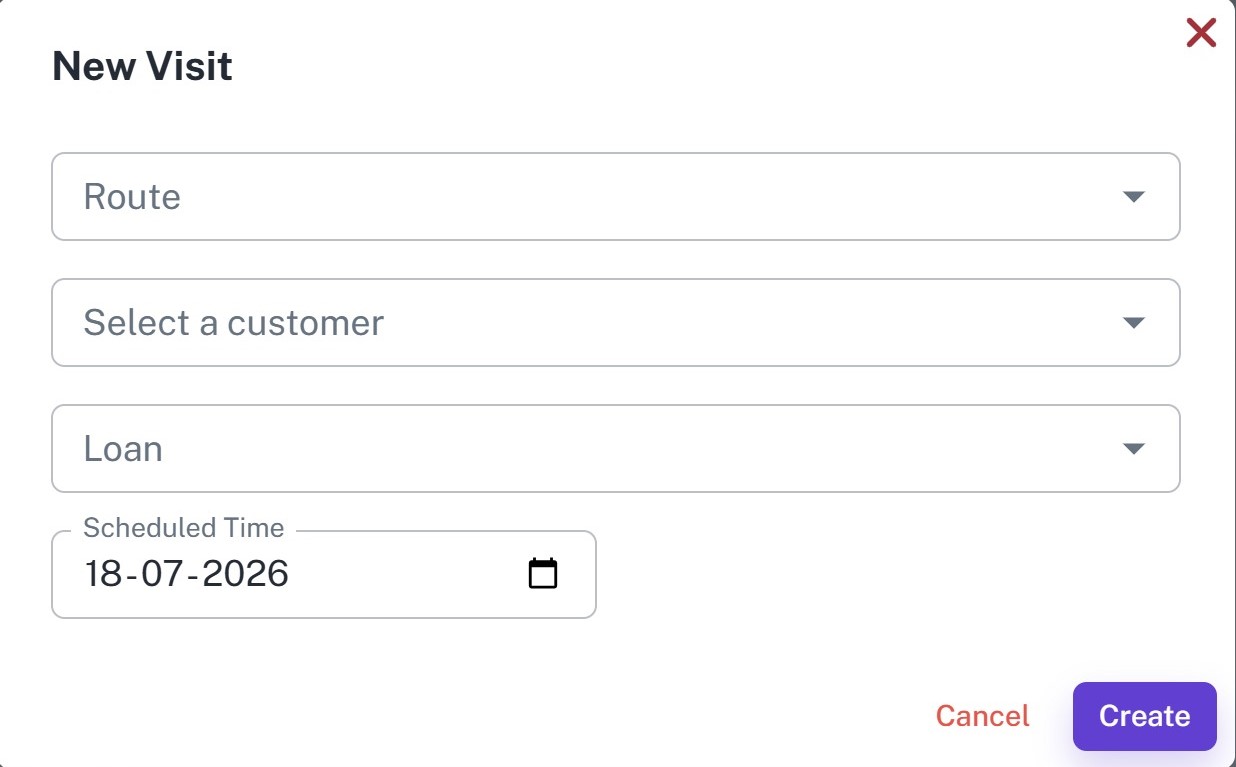
Create visits by selecting the route, customer, loan, and scheduled visit date.
2. Record Unsuccessful Collections
Record customer visits even when no loan repayment is collected, ensuring every field visit is documented.
3. Track Field Activity
Monitor customer visits with check-in time, check-out time, visit duration, and GPS location.
4. Route-Based Visit Management
Organize customer visits under assigned routes for better planning and monitoring.
5. Complete Visit History
Maintain a complete history of all customer visits for follow-up, reporting, and collection planning.
Create Visit
Overview
Create a visit to schedule or record a customer meeting under an assigned route. Visits help track customers who were contacted but did not make a loan repayment.
Key Highlights
- Create customer visits
- Select route and customer
- Link the visit to a loan
- Schedule visit date
- Record customer interactions
- Maintain visit history
How It Works
- Select the Route.
- Select the Customer.
- Choose the Loan.
- Set the Scheduled Visit Date.
- Click Create.
Workflow
The field agent creates a visit by selecting the assigned route, customer, loan, and scheduled date. During the visit, if the customer is unable to make a repayment, the visit is recorded for future follow-up while keeping the collection history accurate.
Visits List
Overview
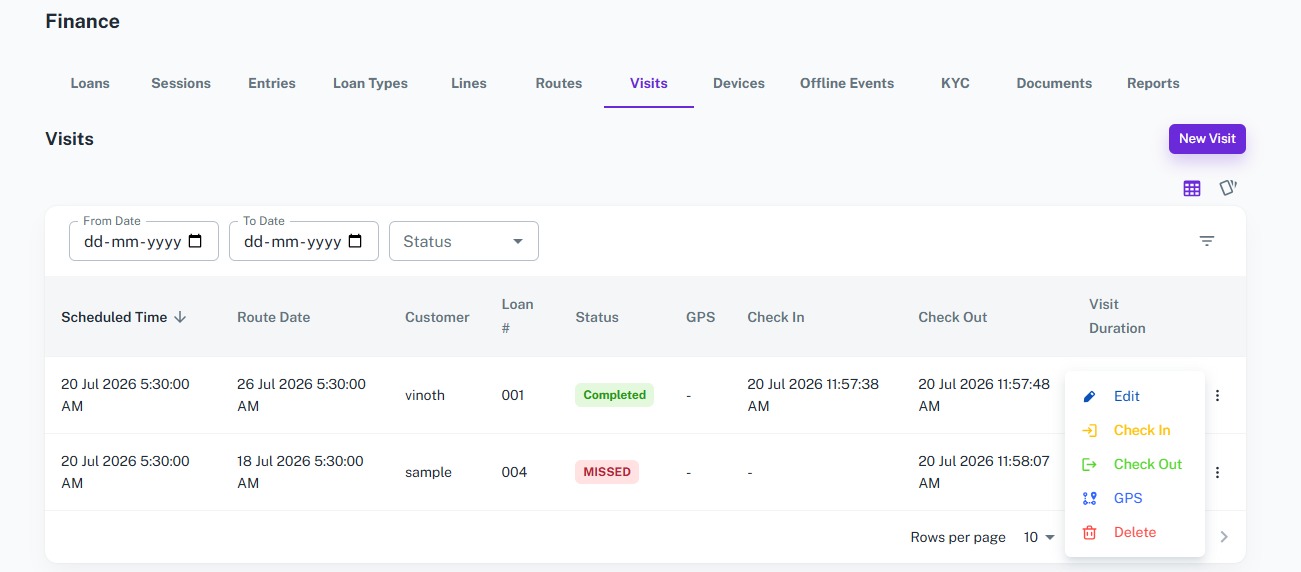
Monitor all customer visits from a centralized dashboard. Track scheduled visits, completed visits, customer details, GPS location, check-in and check-out times, and visit duration.
Key Highlights
- View all customer visits
- Search and filter visits
- Track visit status
- Monitor GPS location
- View check-in and check-out times
- Review visit duration
- Maintain complete visit records
- Record check-in and check-out time
- Capture GPS location during visits
- Automatically calculate visit duration
How It Works
- Open the Visits Dashboard.
- Search or filter visits by date or status.
- View customer and loan details.
- Review GPS location, check-in, check-out, and visit duration.
- Use visit records for future collection planning.
- Field agents check in when they arrive at the customer's location.
- The system records the GPS location and check-in time automatically.
- After completing the customer interaction, the field agent checks out.
- The system records the check-out time and calculates the total visit duration.
Workflow
Managers use the Visits Dashboard to monitor field activities and customer interactions. Every visit is recorded, even when no repayment is collected, providing complete visibility into collection efforts and helping plan future follow-up visits.