Work Log Management
The Work Log module lets managers record exactly what each employee produced during their shift. Log the item, quantity, date, time, and kitchen section against any employee — and have it feed directly into salary calculations. Simple to enter, fully tracked, and always accurate.
Key Highlights of Work Log Management
1. Manager Logs the Work
The admin or manager enters the work done by each employee — no self-reporting, no disputes. Every entry is controlled and recorded by the person in charge.
2. Item & Quantity Tracking
Log exactly what was produced and how much — for example, 50 Biryani, 30 Chapati, 20 Desserts. Each entry captures the item and quantity clearly against the employee's record.
3. Date & Time Recording
Every work log entry is saved with the exact date and time it was recorded — giving you a precise, chronological history of each employee's output.
4. Kitchen & Section Assignment
Each log entry is tied to a specific kitchen or section — Main Kitchen, Bakery, Bar, or any area you operate. This makes it easy to track productivity by location and department.
5. Linked to Salary
Work log data feeds directly into salary calculations. The more accurately work is logged, the more fairly employees are paid — based on real output, not estimates.
New Work Log
Overview
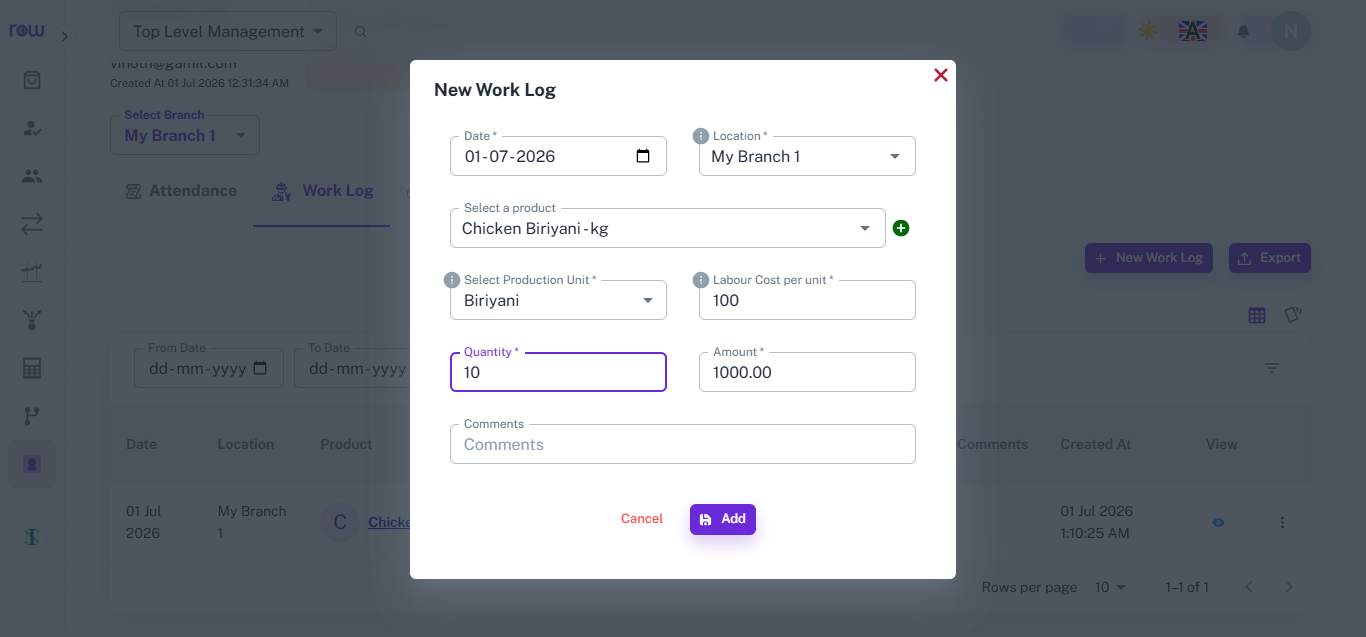
The New Work Log form lets managers record item-based work done by an employee, capturing the product, quantity, and labour cost to calculate payable amount.
Key Highlights
- Product & Production Unit Selection
- Labour Cost per Unit
- Quantity & Amount Calculation
- Branch-Wise Logging
How It Works
- Click New Work Log and select the date and branch location.
- Choose the product from the list — production units must be added to the product beforehand.
- Select the production unit and enter the labour cost per unit.
- Enter the quantity completed; the amount is calculated automatically.
- Add comments if needed, then click Add to save the entry.
Workflow
When an employee completes a task, the manager opens New Work Log, selects the product and production unit, enters the quantity, and the system calculates the amount automatically. The entry is saved and linked to the employee's work log for salary processing.
Work Log List
Overview
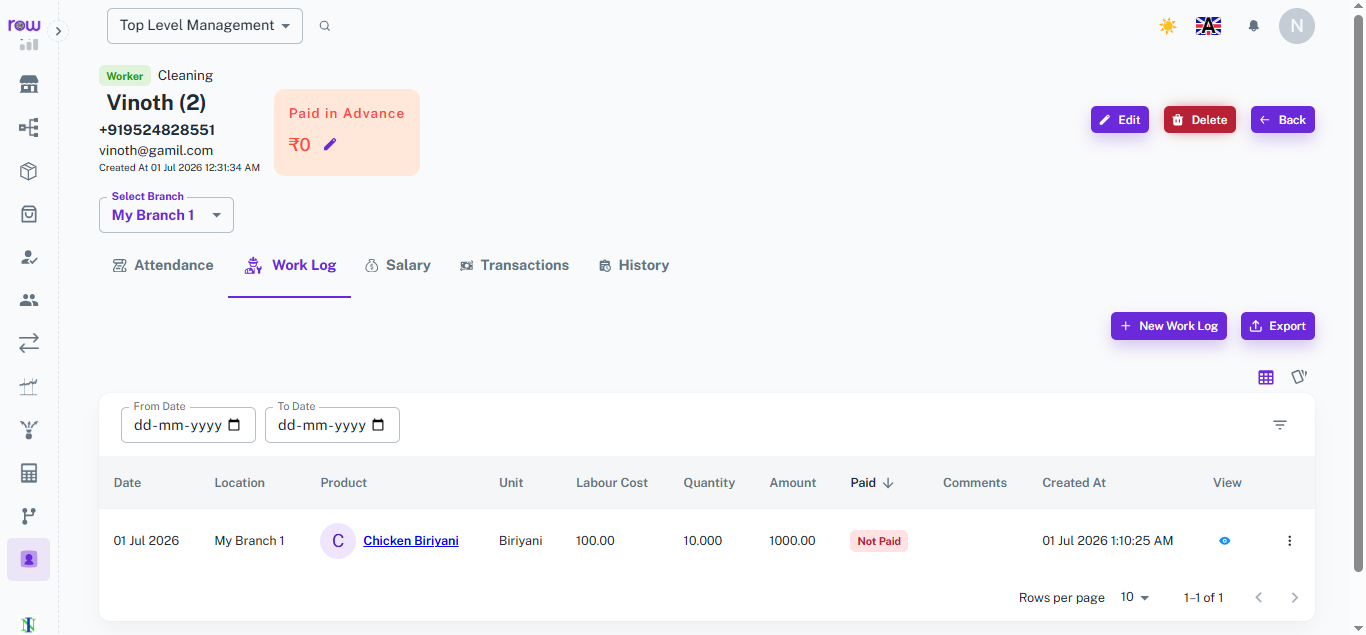
The Work Log List shows every recorded work entry for an employee, giving a clear view of tasks completed, amounts earned, and payment status.
Key Highlights
- Date-Wise Work Records
- Amount & Payment Status
- Quick View & Export
- Date Range Filter
How It Works
- View each work log entry with date, location, product, unit, labour cost, quantity, and amount.
- Check the Paid or Not Paid status for each entry.
- Filter records using From Date and To Date.
- Click the view icon to see full entry details, or use the action menu for more options.
- Export the work log list for reporting.
Workflow
As work log entries are added, they appear in the list with complete details of the task, quantity, and amount. Managers can review the payment status, filter by date, and export records whenever needed for payroll.
How It Works
1. Employee completes their work
The employee finishes a task — cooking a batch, preparing items, or completing a production run — and informs the manager.
2. Manager logs the entry
The admin or manager opens the work log, selects the employee, and enters the item, quantity, date, time, and kitchen section. The entry is saved instantly.
3. Work log is stored against the employee
Every entry is recorded under the employee's profile — building a full history of their daily output across shifts and sections.
4. Data flows into salary
At the end of the pay period, the work log data is used in salary calculations — ensuring every employee is paid accurately based on the work they actually completed.
Workflow
After an employee completes their work, the manager opens the work log and records the entry — selecting the employee, item produced, quantity, date, time, and kitchen section. The entry is saved instantly against the employee's profile. Over the pay period, these logs build a complete picture of each employee's output across every shift and section. At salary time, the work log data is used directly in calculations — ensuring every employee is compensated accurately for the work they actually did, with a clear record to back it up.



















